EasyManua.ls Logo

Uniphone 1150 - Making a Telephone Call with Text

Uniphone 1150
62 pages
Print Icon
To Next Page IconTo Next Page
To Previous Page IconTo Previous Page
Loading...
CALLING
•
17
1 2 3 4 5 6 7 8 9 0
! £ # % ^ & ( )
X
Q W E R T Y U I O P
A S D F G H J K L
Z X C V B N M
;
,
"
'
?
/
+
=
:
.
Menu
Vol
Shift
On /Off
TTY
Dial
Shift
UNIPHONE 1150
by ULTRATEC
HOLD
DOWN
…
…
AND
PRESS
ANNOUNCER
1 2 3 4 5 6 7 8 9 0
! £ # % ^ & ( )
X
Q W E R T Y U I O P
+
=
RING
Shift
1 2 3 4 5 6 7 8 9 0
! £ $ % ^ & ( )
X
Q W E R T Y U I O P
A S D F G H J K L
ZXCVBNM
;
"
'
?
+
=
:
Shift
TYPE
DIAL: 2225
—
Dial
PRESS
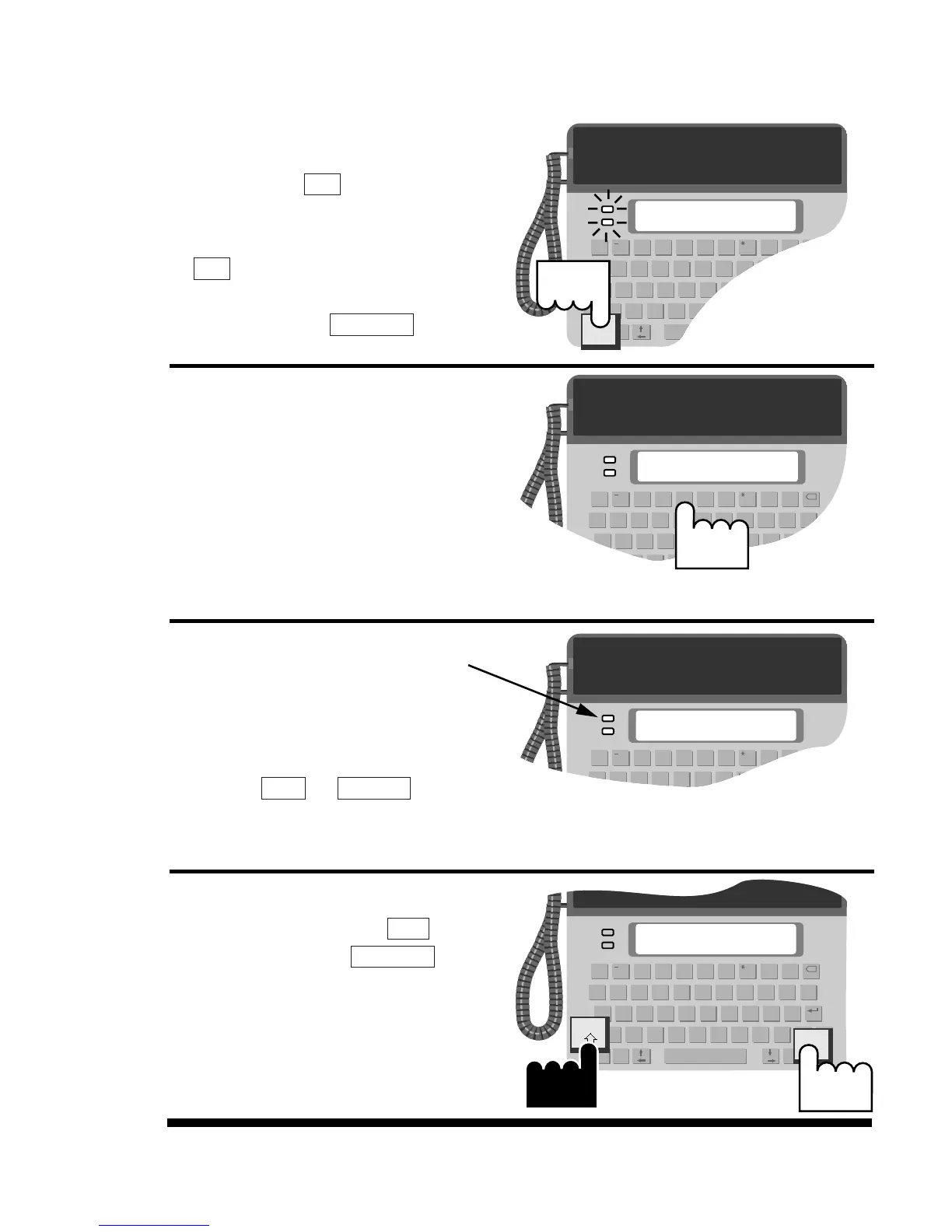
Making a telephone call
with text
1. Press the key. Both the
off-hook and signal lights
will come on. (Pressing the
key turns on the text
telephone. You do not need
to press the key).
2.
Type the telephone number.
The Uniphone 1150 dials as
you type.
3.
Watch the signal light and
display for a ring signal.
When you see an answer on
the display, type a greeting.
Press +
to use
the voice announcer.
4.
When your call is finished,
hold down either key
and press the key
to hang up.
TTY On/Off
Shift
Announcer
Menu
TTY On/Off
Dial
Dial