22
•
A D V A N C E D CALLING
Using the voice announcer
The voice announcer is a recording of a person’s voice that
says, “Text call, please use text telephone.” Use the voice
announcer to ask hearing people to use a text telephone. Each
time the voice announcer speaks, you see ANNOUNCING on
the display. You can turn on the voice announcer by pressing
the + keys. The voice announcer will stop when
you start typing, receive characters, or press the +
keys again.
About Turbo Code
®
Turbo Code
®
communication is an enhanced Baudot code.
When you are communicating with another Turbo Code-
equipped text telephone, you can type as fast as you want with-
out waiting for the unit to catch up.
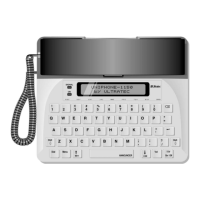
The Uniphone 1150 automatically connects in Turbo Code,
Baudot, or CCITT code depending on which code the other text
telephone is using.
Turbo Code allows you to use the interrupt and the wait-for-
response features.
You can turn off Turbo Code by following these steps:
1. Press the key.
2. Press the key to display the Options menu.
3. Press the Left key, the Right key, and the key
all at the same time to display the Options 2 menu.
4. Press the key. You will see TURBO CODE OFF.
5. Press the key to leave the Options 2 menu.
Follow the same steps to turn on Turbo Code again.
Menu
ShiftShift
O
Menu
Announcer
Menu
Announcer
Menu


 To Next Page