EasyManua.ls Logo

Uniphone 1150 - Making a VCO Call

Uniphone 1150
62 pages
Print Icon
To Next Page IconTo Next Page
To Previous Page IconTo Previous Page
Loading...
Shift
1 2 3 4 5 6 7 8 9 0
! £ $ % ^ & ( )
X
Q W E R T Y U I O P
A S D F G H J K L
Z X C V B N M
;
,
"
'
?
/
+
=
:
.
Menu
Vol
Shift
Dial
ANNOUNCER
TTY
On/Off
CCITT VCO – MENU THEN V
Shift
1 2 3 4 5 6 7 8 9 0
! £ # % ^ & ( )
X
Q W E R T Y U I O P
A S D F G H J K L
Z X C V B N M
;
,
"
'
?
/
+
=
:
.
Menu
Vol
Shift
Dial
Hello GA Hello Carol this is
Mellissa pick up VCO
ANNOUNCER
TTY
On/Off
TYPE
Shift
1 2 3 4 5 6 7 8 9 0
! £ $ % ^ & ( )
X
Q W E R T Y U I O P
A S D F G H J K L
Z X C V B N M
;
,
"
'
?
/
+
=
:
.
Menu
Vol
Shift
Dial
ANNOUNCING
ANNOUNCER
TTY
On/Off
Menu
PRESS
AND. . .
ANNOUNCER
. . .THEN
PRESS
Shift
1 2 3 4 5 6 7 8 9 0
! £ # % ^ & ( )
X
Q W E R T Y U I O P
A S D F G H J K L
Z X C V B N M
;
,
"
'
?
/
+
=
:
.
Menu
Shift
TEXT-TELEPHONE
DIAL: 5557676
Dial
PRESS. . .
. . .AND
DIAL
ANNOUNCER
Vol TTY
On/Off
28
VCO CALLING
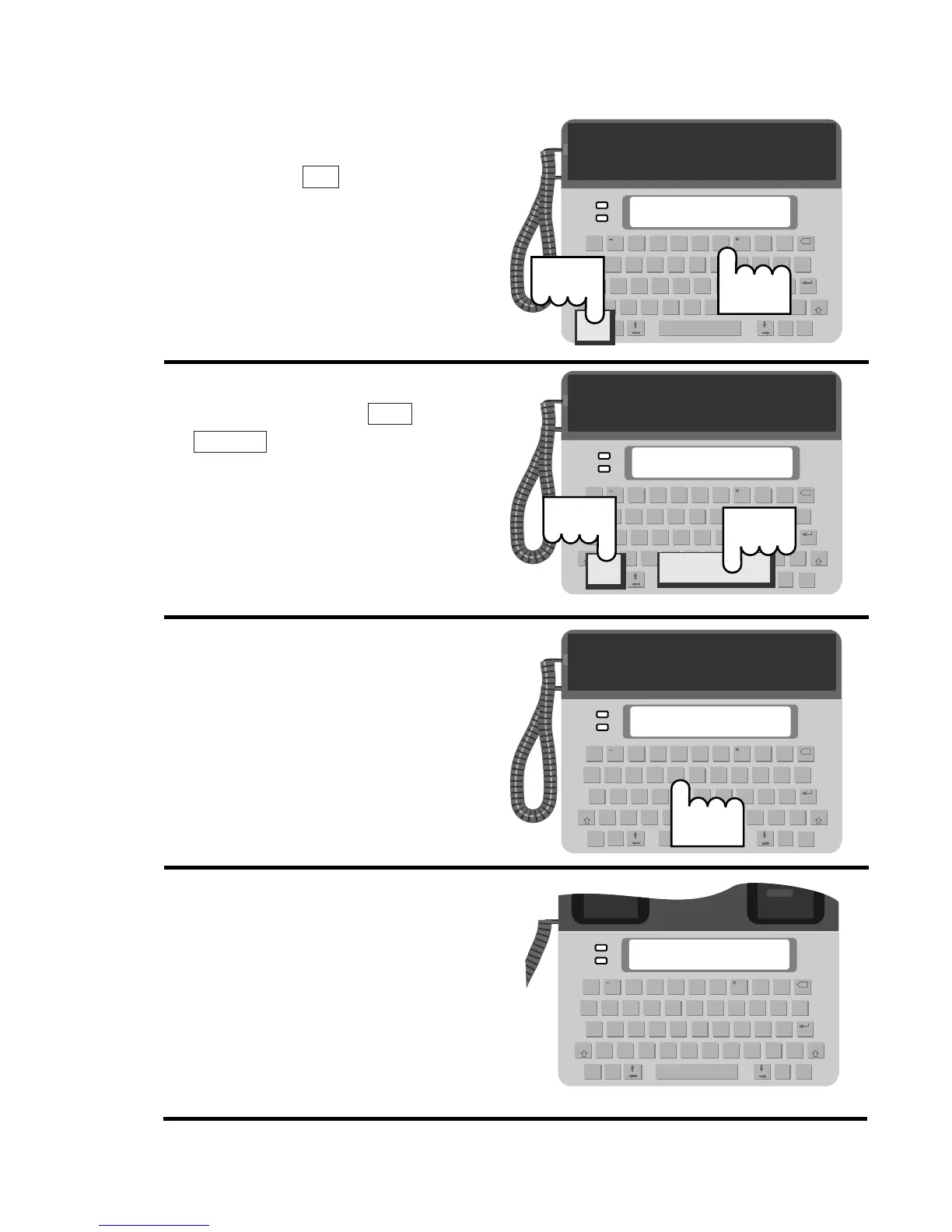
Making a VCO call
1. Press the key and dial
the person’s number using
the number keys.
2. Turn on the voice announcer
by pressing the +
. This will tell the
person to use his or her text
telephone (minicom).
3. After the person answers
with text, type a message
explaining that you want
the call to be VCO.
4. Pick up the handset.
Announcer
Menu
Dial