EasyManua.ls Logo

Uniphone 1150 - Page 31

Uniphone 1150
62 pages
Print Icon
To Next Page IconTo Next Page
To Previous Page IconTo Previous Page
Loading...
Shift
1 2 3 4 5 6 7 8 9 0
! £ $ % ^ & ( )
X
Q W E R T Y U I O P
A S D F G H J K L
Z X C V B N M
;
,
"
'
?
/
+
=
:
.
Menu
Vol
Shift
Dial
UNIPHONE–1150
by ULTRATEC
ANNOUNCER
TTY
On/Off
Shift
TTY
On/Off
AND
PRESS
HOLD
DOWN
Shift
1 2 3 4 5 6 7 8 9 0
! £ $ % ^ & ( )
X
Q W E R T Y U I O P
A S D F G H J K L
Z X C V B N M
;
,
"
'
?
/
+
=
:
.
Menu
Vol
Shift
Dial
Melissa pickup GA Yes pls
bring a dessert GA
ANNOUNCER
TTY
On/Off
ANNOUNCER
PRESS
Shift
1 2 3 4 5 6 7 8 9 0
! £ $ % ^ & ( )
X
Q W E R T Y U I O P
A S D F G H J K L
Z X C V B N M
;
,
"
'
?
/
+
=
:
.
Menu
Vol
Shift
Dial
VOICE MODE
PRESS SPACE FOR TEXT
ANNOUNCER
TTY
On/Off
Menu
V
. . .THEN
PRESS
PRESS
AND. . .
VCO CALLING
29
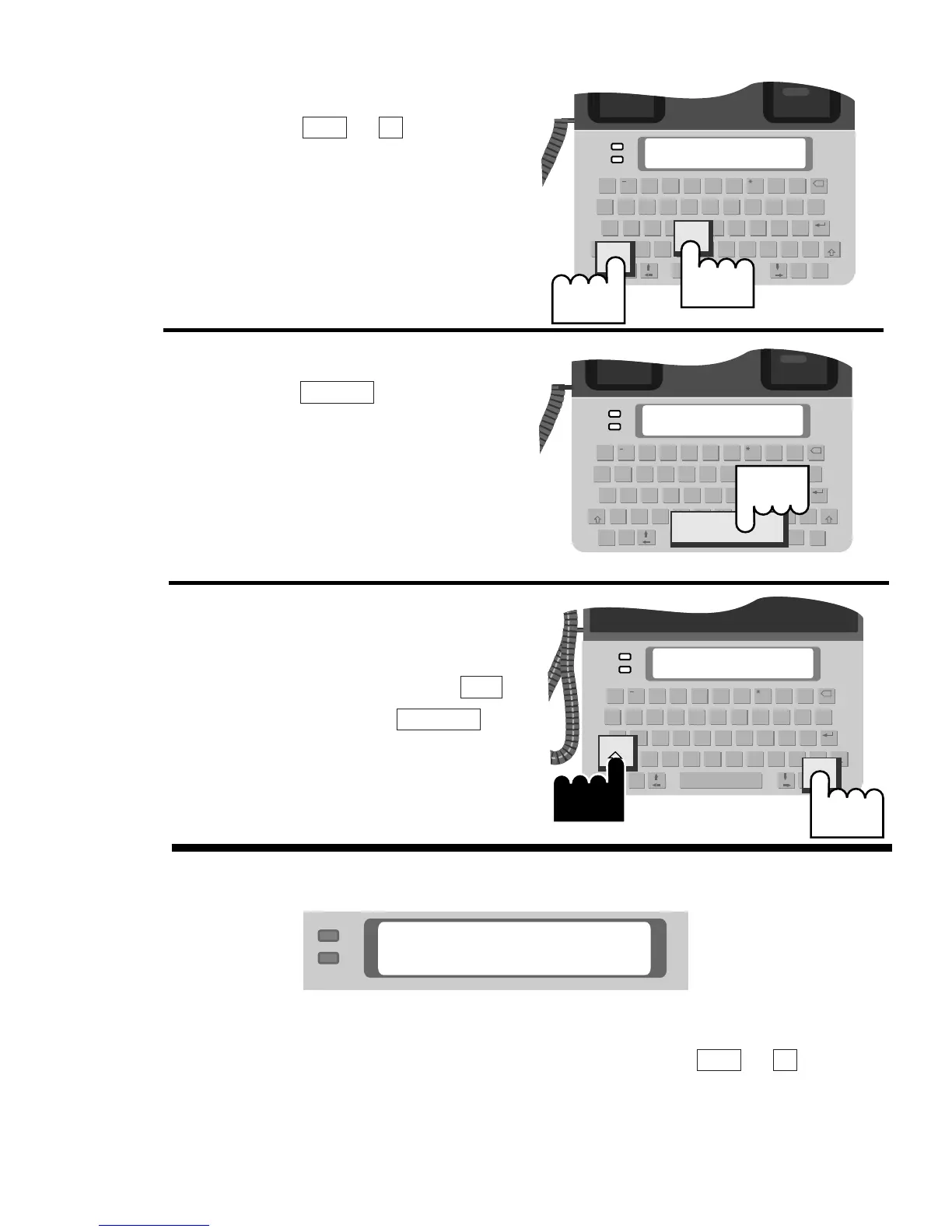
5. Press the + to turn
on VCO. Begin speaking
into the handset.
6. When you finish speaking,
press the to recon-
nect into text mode. You do
not need to replace the
handset.
Repeat steps 5-6 until your
conversation is finished.
7. When the conversation is
finished, hang up the hand-
set; then hold down the
key and press the
key.
TTY On/Off
Shift
Spacebar
VMenu
Note: After you pick up the handset, you may see this display
screen:
This display screen means your call connected using Baudot,
EDTN, or Turbo Code. You do not need to press + each
time you want to speak. Begin speaking when you see this dis-
play screen.
VMenu

TEXT TELEPHONE–VCO