INTRODUCTION
•
5
INTRODUCTION
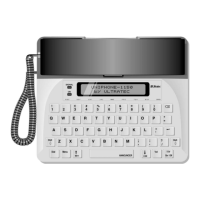
Your new Uniphone 1150
™
telephone can also be used as a text
telephone (minicom). You can make telephone calls, text-tele-
phone calls, or text-telephone calls with voice carry-over (VCO).
For a voice call, pick up the handset and use the Uniphone
1150 just like a regular telephone.
For a text-telephone call, press the key and type. To
use VCO, pick up the handset at any time during your call.
Other features of the Uniphone 1150:
Auto-answer
answers the telephone when you are busy or away
and takes text-telephone messages.
Auto ID
™
alert system tells a hearing person that you are call-
ing by text telephone.
Battery backup
allows you to use the Uniphone 1150 during a
power failure. The battery will power the Uniphone 1150 for an
hour if the electricity goes off.
Call progress
displays RING, ENGAGED, or LINE UNOBTAIN-
ABLE on the display to let you know what is happening on the
phone line.
A built-in
greeting message
lets you send out a quick “Hello GA.”
The voice announcer tells a hearing person to use a text tele-
phone. A
ringer
and
personal indicator
both signal a call.
Turbo Code
®
communication sends signals to other Turbo Code-
equipped text telephones as fast as you can type. Turbo Code
allows you to interrupt the other person while he or she is typ-
ing. Turbo Code also allows you to use the wait for response
feature.
TTY On/Off


 To Next Page