Apollo Solo Manual UA Account & Store 106
UAD Authorization Procedure
UAD plug‑ins are automatically authorized each time the computer is started. However,
the UAD system must be manually authorized whenever a plug‑in is purchased from the
UA store.
Note: Follow this procedure to manually authorize a new UAD plug-in purchase
whenever you buy a plug-in at the UA store.
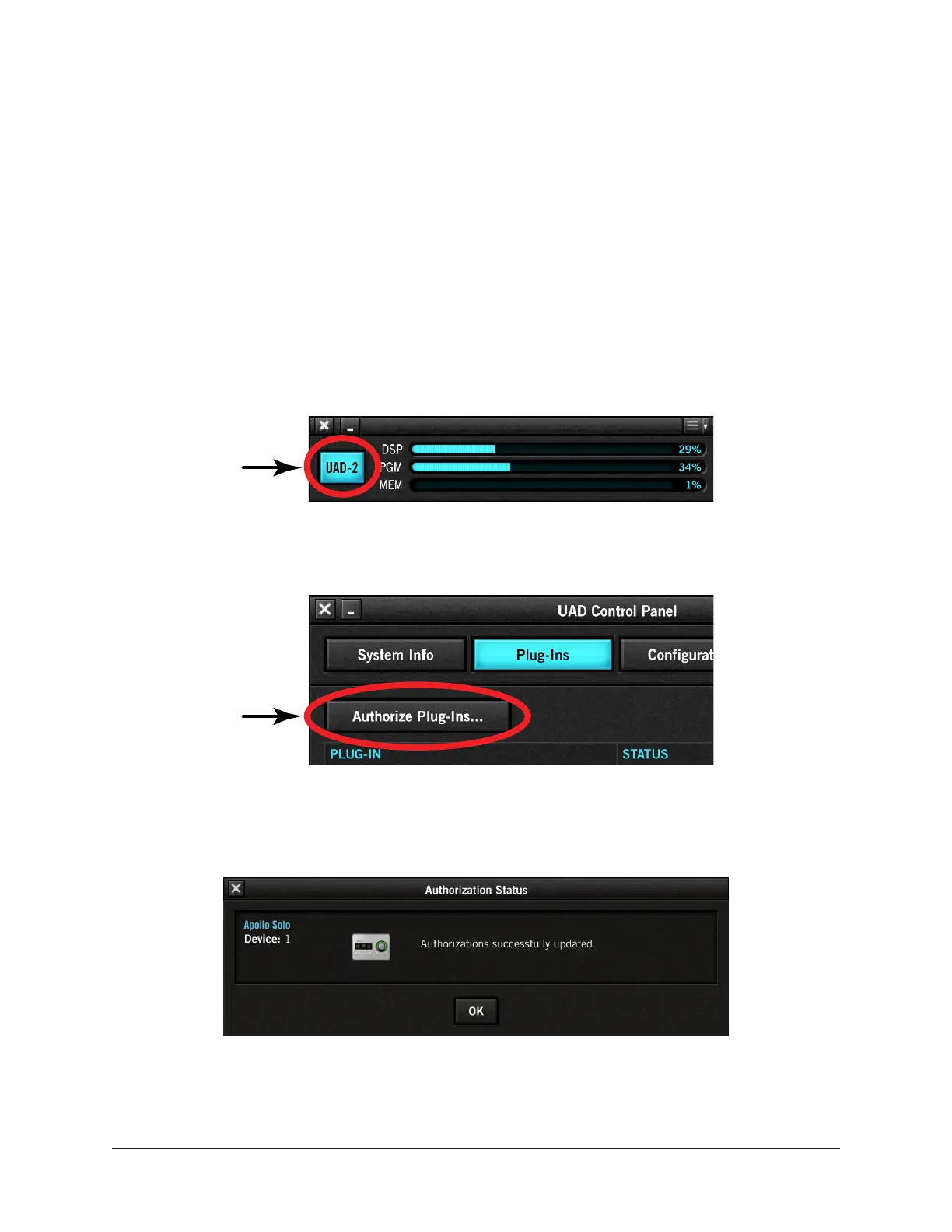
To manually authorize UAD plug-ins to run on the UAD device:
1. Open the UAD Meter & Control Panel application (see Launching the Application
for methods).
2. Access the Plug‑Ins Panel within the application by clicking the blue “UAD‑2”
button in the UAD Meter window.
Click
3. Click the “Authorize Plug‑Ins” button in the Plug‑Ins panel.
Click
4. After a few moments the Authorization Status window appears. Click OK to close
the window.
UAD plug-ins are now authorized and ready for use.















 To Next Page