Apollo Solo Manual Using UAD Plug-Ins 78
Using UAD Plug-Ins
After the UAD hardware and software have been properly installed and configured, UAD
plug-ins are accessed and used just like any native (host-based) plug-in. All UAD plug-
ins can run concurrently with each other and with native plug-ins simultaneously, in any
combination. Note that UAD plug-ins running at 96 kHz use twice as much UAD DSP
resources than those used at 48 kHz, and so forth.
Note: To learn how insert UAD plug-ins, consult your DAW documentation.
The UAD Plug-In Interface
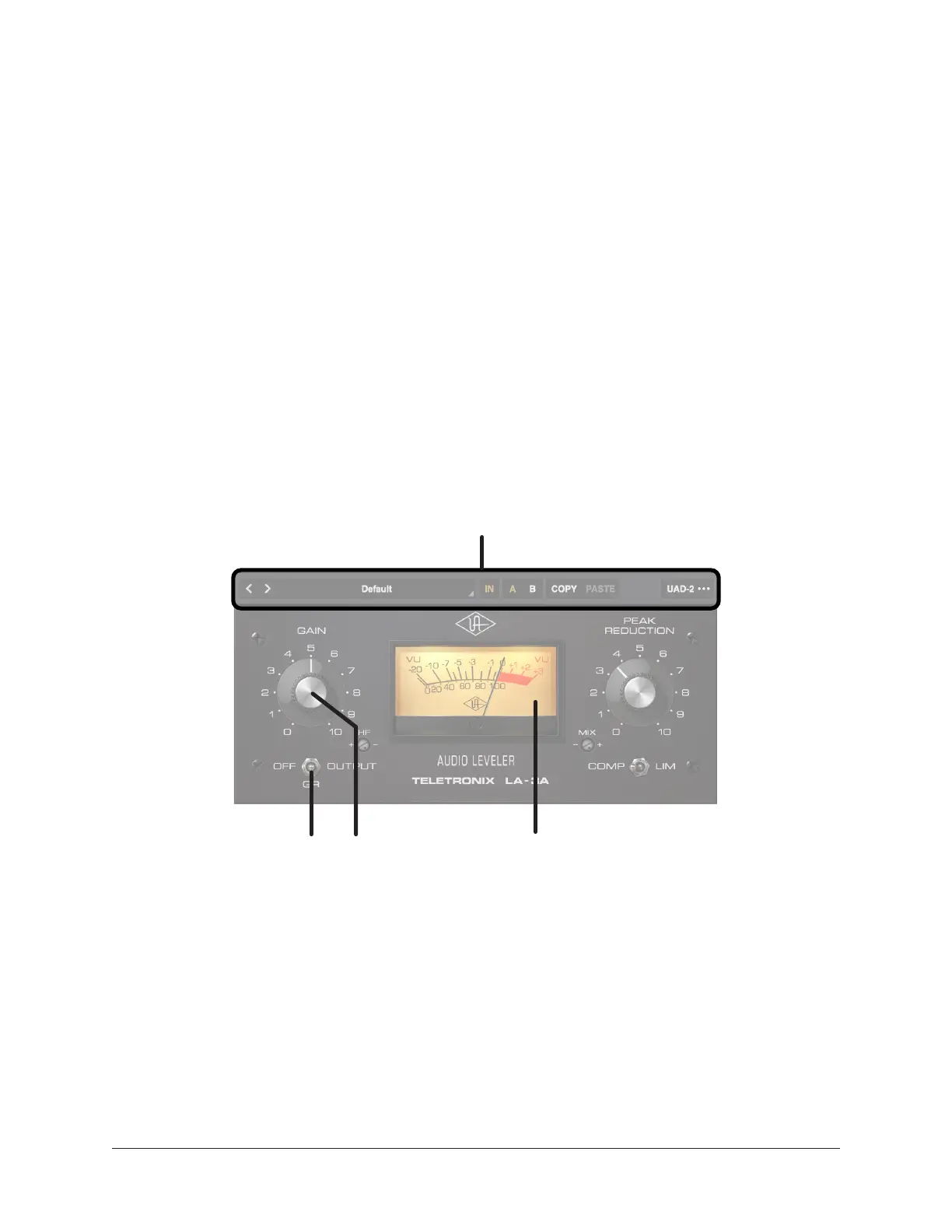
One typical UAD plug-in interface is shown below. Each plug-in contains various control
parameters for modifying the sound of the plug-in, display-only elements (such as
meters) for visual feedback, and the UAD Toolbar. The UAD Toolbar is common to all
UAD plug-ins, and is displayed at the bottom of the interface.
Typical UAD plug-in interface
UAD Toolbar
(common to all UAD plug-ins)
Typical display-only element
(not a control parameter)
Typical interactive
control parameters















 To Next Page