Chapter 3: Controls and Features
UT100 Handheld Pulse Oximeter Operation Manual 3-3
15. USB Interface
The USB interface is used to connect the monitor with PC for trend data
output.
16. AC Power Jack
An optional AC
power supply connects
her
e
.
17. Slot for hanging strap
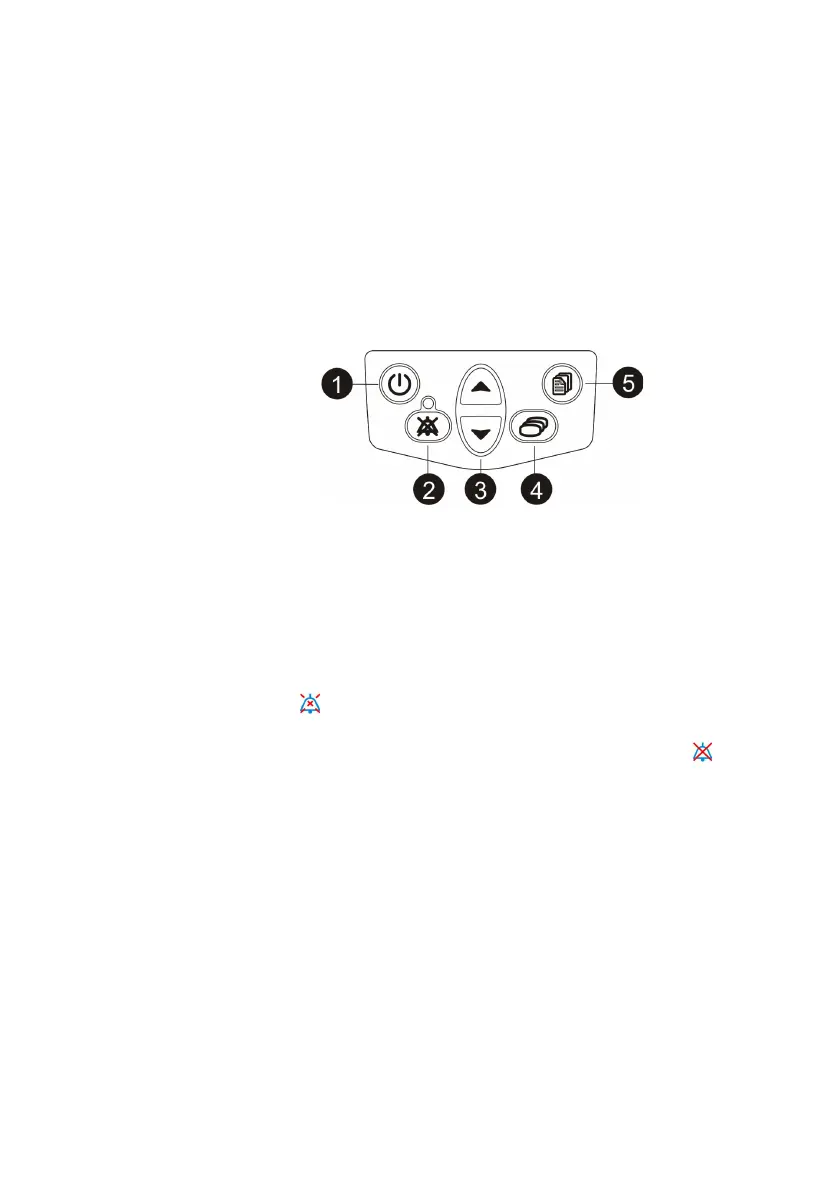
3.2 Monitor Operating keys
Figure 3.2: Monitor Operating Keys
1. ON/OFF
k
e
y
Pressing this key for 5 seconds turns the monitor ON and OFF.
2.
Silence key
Pressing the Silence key once disables the pulse/alarm tone for two
(2)
minutes
.
The icon will flash about 3 seconds at the upper-right corner of
the screen. Pressing the Silence key twice disables the pulse/
alar
m
tone
indefinitely (until canceled or the monitor is turned
off
). The icon will
flash about 3 seconds at the upper-right corner of the screen.
To
cancel either
the
indefinit
e
or the two-minute pulse/alarm and alert tone silenced
condition, press the Silence
key once.
T
he
Silence indicator
will
turn
off
.
3.
Up and Down Arrows
The Up and Down arrow keys are used to adjust the following
settings:
• Alarm/ Pulse Volume
• Move the cursor circularly.
• Increase/decrease numbers
• Choose options.
4. Mode Key
Press this key to switch between the four display modes that are big display
mode, waveform mode, trend table mode and horizontal display mode.


 To Next Page