Chapter 4: Operating Instructions
UT100 Handheld Pulse Oximeter Operation Manual 4-5
Neonatal SpO
2
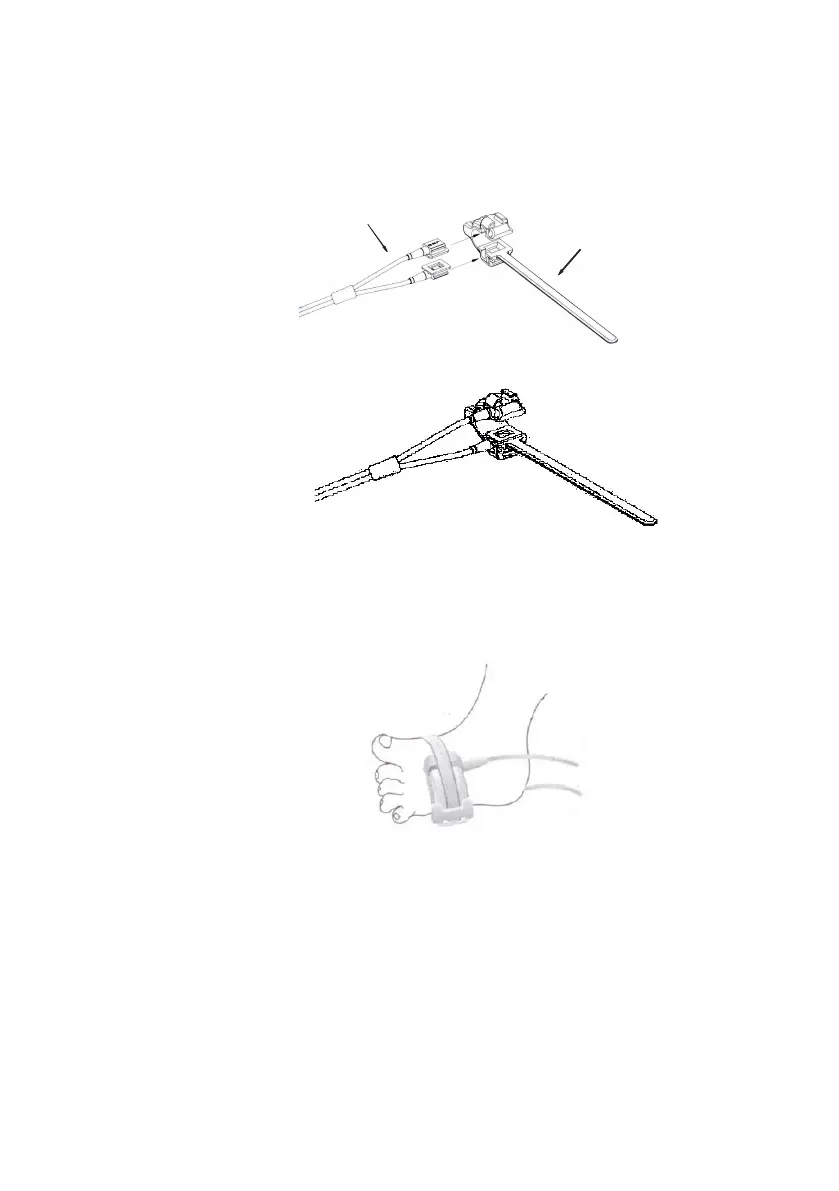
sensors are Y-type with a rubber wrap. First insert the Y into
the slots of the wrap as shown in Figure 4-4. After placed, the Neonatal SpO
2
sensors look like Figure 4-5.
Silicon Wrap
2
Figure 4.4 Placing Neonatal SpO
2
Sensor
Figure 4.5 Placing Neonatal SpO
2
Sensor
Place the sensor onto the foot or hand. Secure the wrap (about 20mm long) to
ensure the correct position of the sensor as shown in Figure 4-6. Do not secure
the wrap too tight as it may affect the blood flow.
Figure 4.6 Placing Neonatal SpO
2
Sensor
4.4.3 Checking the Sensor and Oximetry Cable
Follow these instructions each time before you attach the sensor to the
patient. T
his
helps
ensur
e
the sensor and oximetry cable are working
proper
ly
.
WARNING! Using a damaged sensor/cable may cause inaccurate
readings. Inspect each sensor/cable. If a sensor/cable
appears damaged, do not use it. Use another sensor/cable


 To Next Page