Chapter 5: Changing the Monitor’s Settings
5-4 UT100 Handheld Pulse Oximeter Operation Manual
equal to or
lo
w
er
than the low alarm and you cannot set the low
alarm equal to or higher than
the
high alarm.
NOTE! While setting alarm limits, if no keys are pressed for twenty
seconds, the alarm limit setting mode is exited and the SpO
2
and
pulse rate measurements are shown. Changes aren’t saved.
NOTE! The alarm actions occur for each violated alarm, even if more than
one alarm is violated at the same time.
NOTE! Alarms may be tested while the monitor is in use by setting alarm
limits such that the measured parameter is outside alarm limits.
Return limits to the required settings after testing.
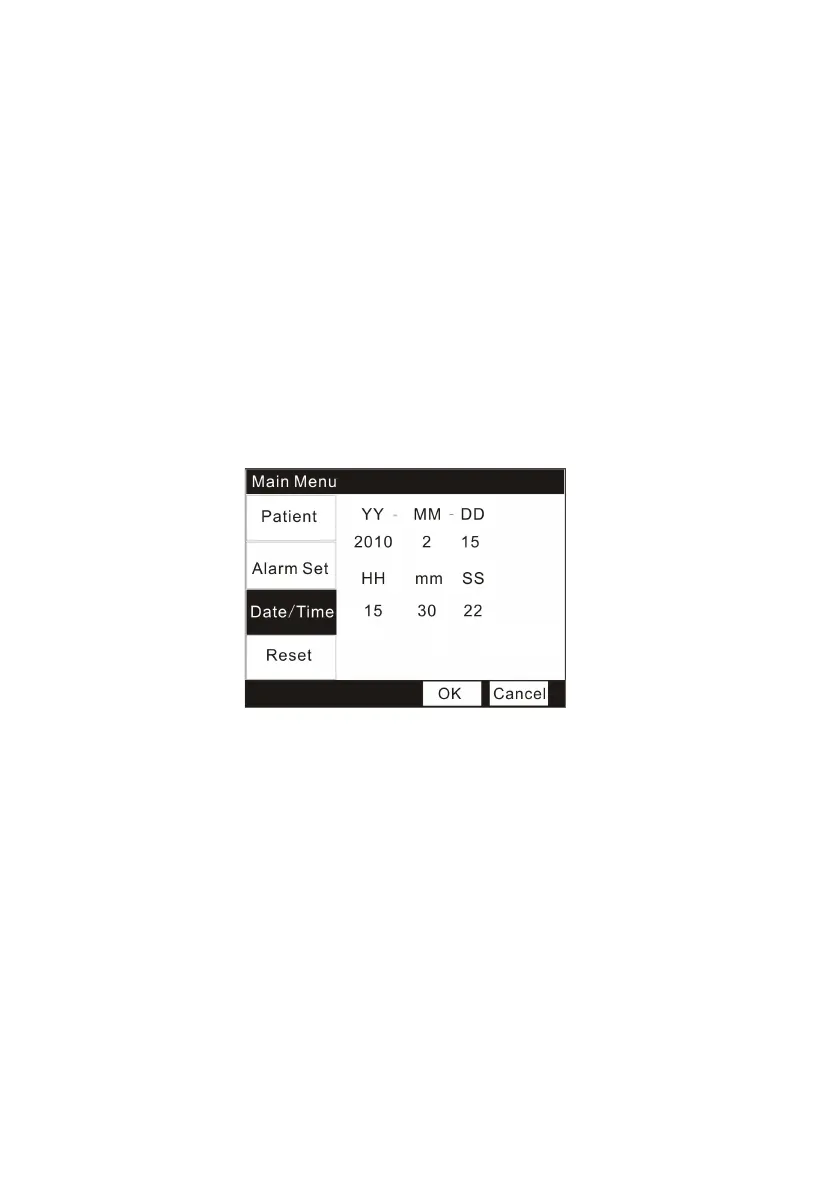
5.4 Changing the date and time
Figure 5.4 Changing the date and time
1. Press the Menu key to enter into the Main Menu interface.
2. Press the Down key thrice and the Menu key to select the
“
Date/Time
”
submenu.
3. Press the Up/Down key to choose items you want to change and press the
Menu key to active the items.
4. Press the Up/Down key increase/decrease the setting and then use the
Menu key again to exit.
5. Press the Up/Down key to OK/ Cancel button to confirm/ cancel your
settings.
5.5 Resetting


 To Next Page