Chapter 6: Trend Data Output and Analysis
UT100 Handheld Pulse Oximeter Operation Manual 6-1
Chapter 6 Trend Data Output and Analysis
6.1 Connecting the Oximeter to PC
The UT100 can store 120 hours of SpO
2
, Pulse Rate, Trend Data captured at 1
second intervals. This trend data can be transferred to a PC for evaluation.
Trend data is stored in non-volatile memory, so it is not erased when the unit
is shut off or when the batteries are replaced.
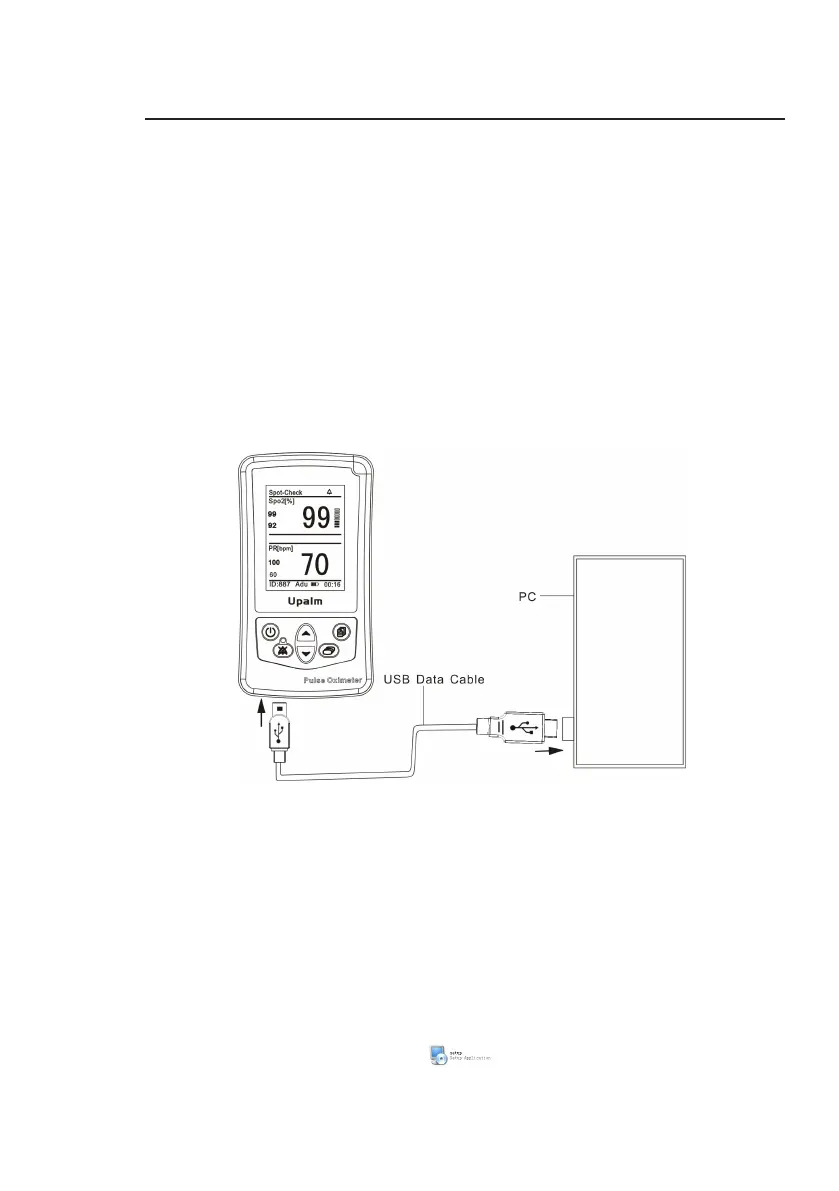
The device will send out trend data through USB interface so that the data can
be stored, analyzed and printed. An additional USB Data Cable is required to
connect the device to a PC.
Figure 6.1: PC Communication Setup
6.2 Installing the Oximetry Data Management System
The Oximetry Data Management System (ODMS) is a management and
analysis system for oximetry data. It supplies functions like data download,
data review, case information edit, data analysis and result print etc. To install
the ODMS, Please conduct the following steps:
1. Insert the CD into CD-ROM.
2. Copy to the Setup file from the CD to your computer.
3. Open the Setup file and dblclick to install it. It will take about 1
minute.


 To Next Page