Chapter 5: Changing the Monitor’s Settings
UT100 Handheld Pulse Oximeter Operation Manual 5-1
Chapter 5: Changing the Monitor’s Settings
5.1 Changing the Pulse and Alarm Volume
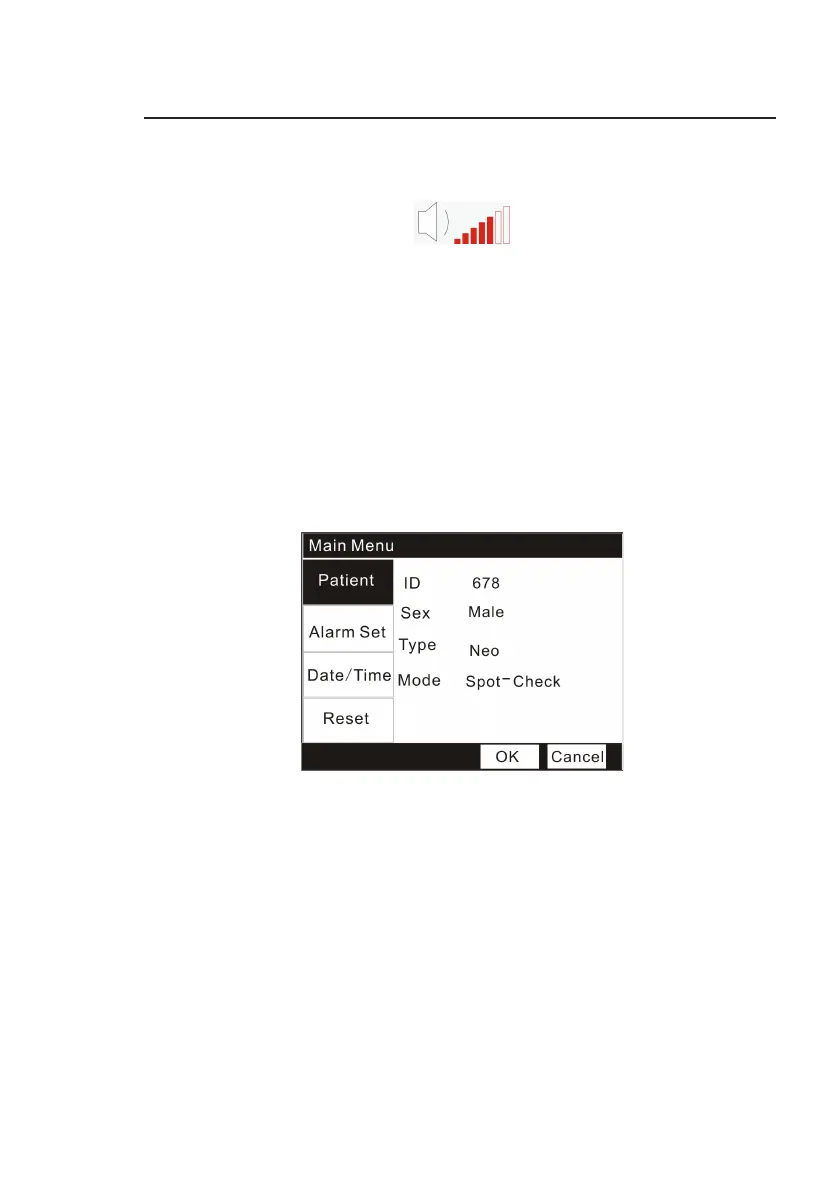
Figure 5.1 Volume Bar
A
“
beep
”
tone sounds with each pulse beat.
T
he
volume of the
“
beep
”
can be
adjusted to seven
(7)
settings
.
Setting the volume by pressing the Up and
Down
Arrow,
t
he
volume is
increased or decreased
with each key
pr
ess
.
5.2 Managing the Patient’s Information
Please write down the information of the patient who is going to be
monitored like: Patient’s ID (from 000 to 999), Sex (Male or Female), Type
(Adult/ pediatric /neonatal) and Mode (Spot-Check/Record/Monitor).
Figure 5.2 Managing the patient’s information
1. Press the Menu key to enter into the Main Menu interface.
2. Press the Down key and the Menu key to enter the
“
Patient
”
submenu.
3. Press the Up/Down key to choose items you want to change and press the
Menu key to active the items.
4. Press the Up/Down key increase/decrease the setting and then use the
Menu key again to exit.
5. Press the Up/Down key to OK/ Cancel button to confirm/ cancel your
settings.
5.3 Changing the Alarm Limits


 To Next Page