Chapter 5: Changing the Monitor’s Settings
UT100 Handheld Pulse Oximeter Operation Manual 5-3
Battery
abnormal
High Yes
“Battery abnormal” will be
displayed in red at the
Alarm Bar.
Two groups of
“dee-dee-dee-d
ee-dee”
Period: 10 secs
NOTE!
The power indicator will flash in red in all levels of alarm.
WARNING! There is not alarm in the Record Measuring Mode.
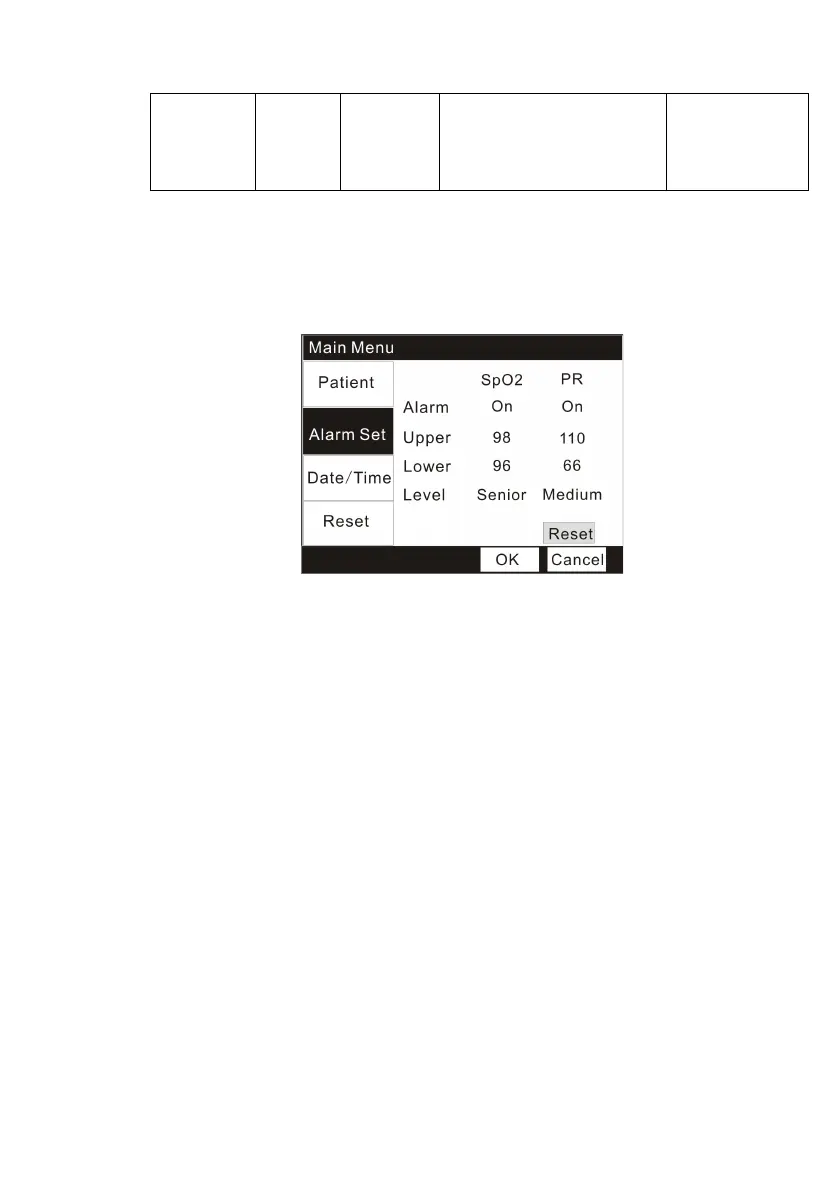
5.3.2 Changing the Alarm Settings
Figure 5.3: Changing the alarm settings
Each
measurement,
SpO
2
and Pulse
R
a
t
e
,
has a high and low alarm limit
setting
.
1. Press the Menu key to enter into the Main Menu interface.
2. Press the Down key twice and the Menu key to enter the
“
Alarm Set
”
submenu.
3. Press the Up/Down key to choose items you want to change and press the
Menu key to active the items.
4. Press the Up/Down key increase/decrease the setting and then use the
Menu key again to exit.
5. Press the Up/Down key to OK/ Cancel button to confirm/ cancel your
settings.
You can press the “Reset” button to reset you settings.
WARNING
!
Be aware of alarm limits of similar units in the same area
when adjusting alarm limits of this device to avoid
c
onfusion.
NOTE!
Ala
rm
limits are
non-overlapping. You
cannot set the high alarm


 To Next Page