Chapter 6: Trend Data Output and Analysis
UT100 Handheld Pulse Oximeter Operation Manual 6-3
1. Connect the UT100 with the PC through an USB data cable.
2. Turn on the UT100.
3. Start the ODMS.
4. Select the appropriate COM port number, if necessary.
5. There are two way to download trend data:
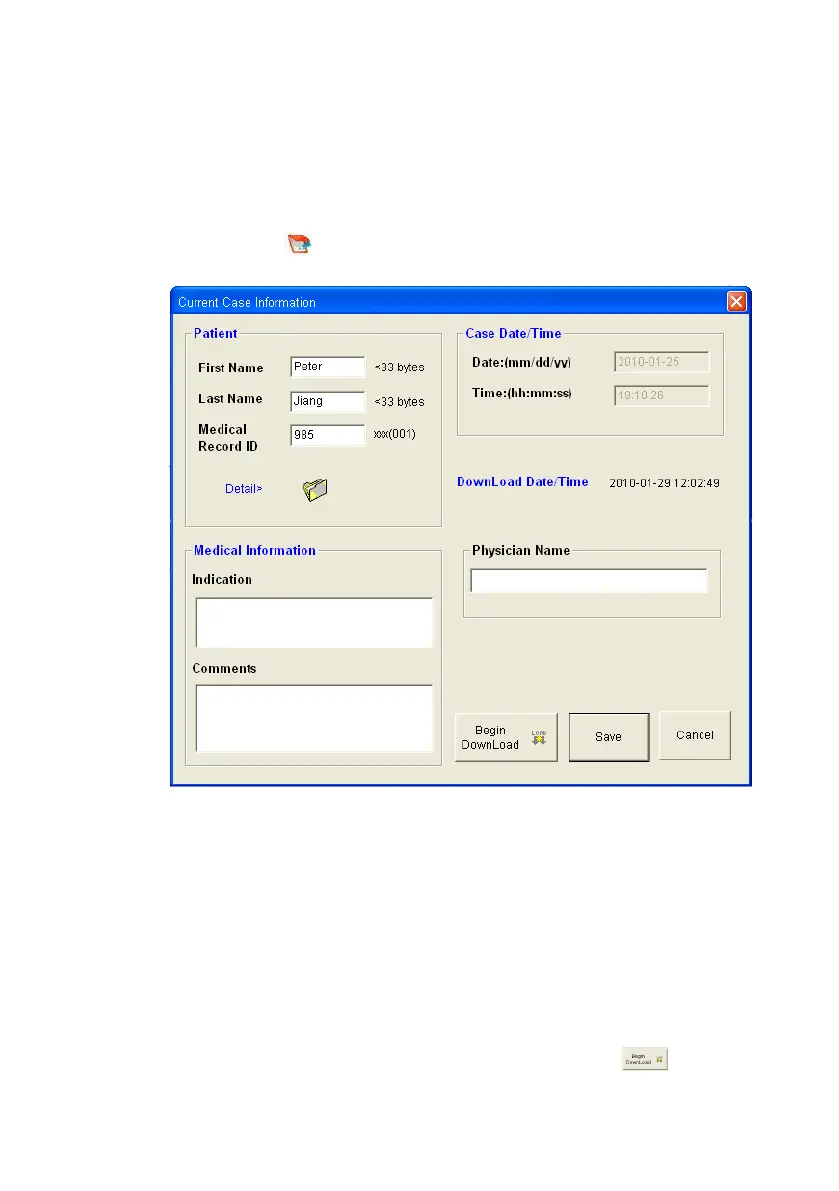
A. Click the icon “ ”or “Case Info” at the main menu, the following interface
will pop up:
Figure 6.3: Case Information
Patient: Fill in the basic and detail information of the patient.
Case Date/Time: Means the time to collect the patient’s data.
DownLoad Date/Time: Means the time to stop collecting the patient’s data.
Medical Information: Fill in the name of physician, indication of the patient
and comments on the patient.
After writing down the current case information, click this button to
begin download the trend data of this ID.


 To Next Page