In any case, upon surfacing and switching AV1 in to a surface mode button's
sensitivity will switch to a maximum one.
To save press OK.
->CompasCalibrate
(only in Surface mode)
Compass calibration procedure start-up. More about the procedure see in Article 7.1.
Upon finishing calibration procedure press Save button to store results in non-volatile
memory.
->TimeToSleep
(only in Surface mode) time setup for automatic dive computer swtich to Sleep mode.
Available setting options: 30sec – 60sec – 2min – 10min – 30min – 60min.
Default setting: 60sec.
In PO2 cells control moe or in eCCR mode AV1 will be making sound signal for 1 min.
and flashing alternately with red and green HUD L.E.D. prior to automatic switch off.
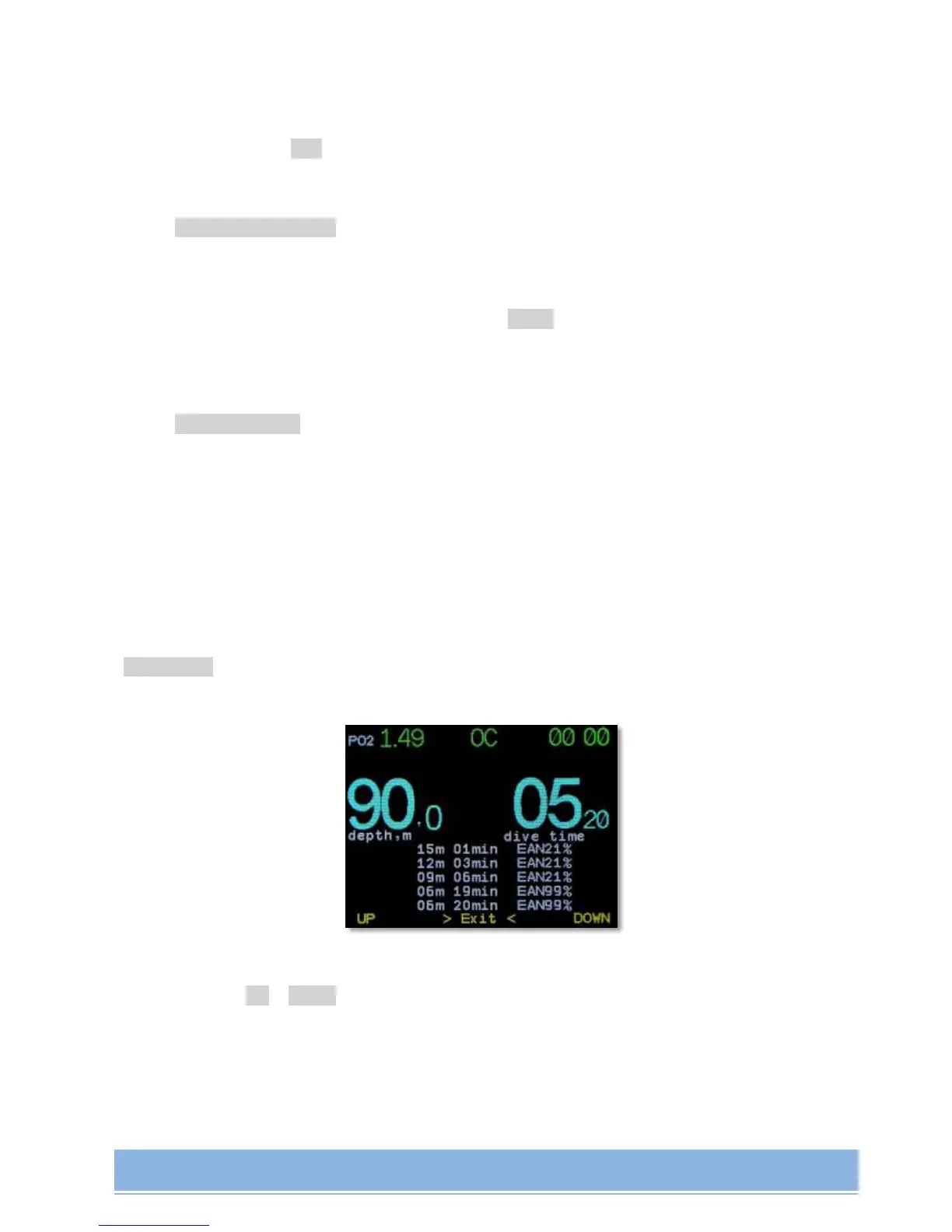
->Diveplan
(only in Dive mode) Looking through forthcoming (planned) safety stops.
A list of forthcoming safety stops is in the bottom part of the screen. To browse through the
list use buttons Up и Down. Exit from browse display - simultaneous pressing of 2 buttons.
If you use AV1 in Gauge Mode and have preliminarily planned your dive in a built-in Dive
Planner, you will be able to look it through during your dive.


 To Next Page