If you have less than 48 hours after the last dive, there will be additional settings on the
screen:
Surface Interval time;
Time to Fly;
Violation warnings of the last dive (if any happened).
5.2 Dive mode
In Dive mode AV1 has two options of information indication on the screen: Basic and
Alternative screens.
Both screen options can be turned on both in OC and in CCR mode.
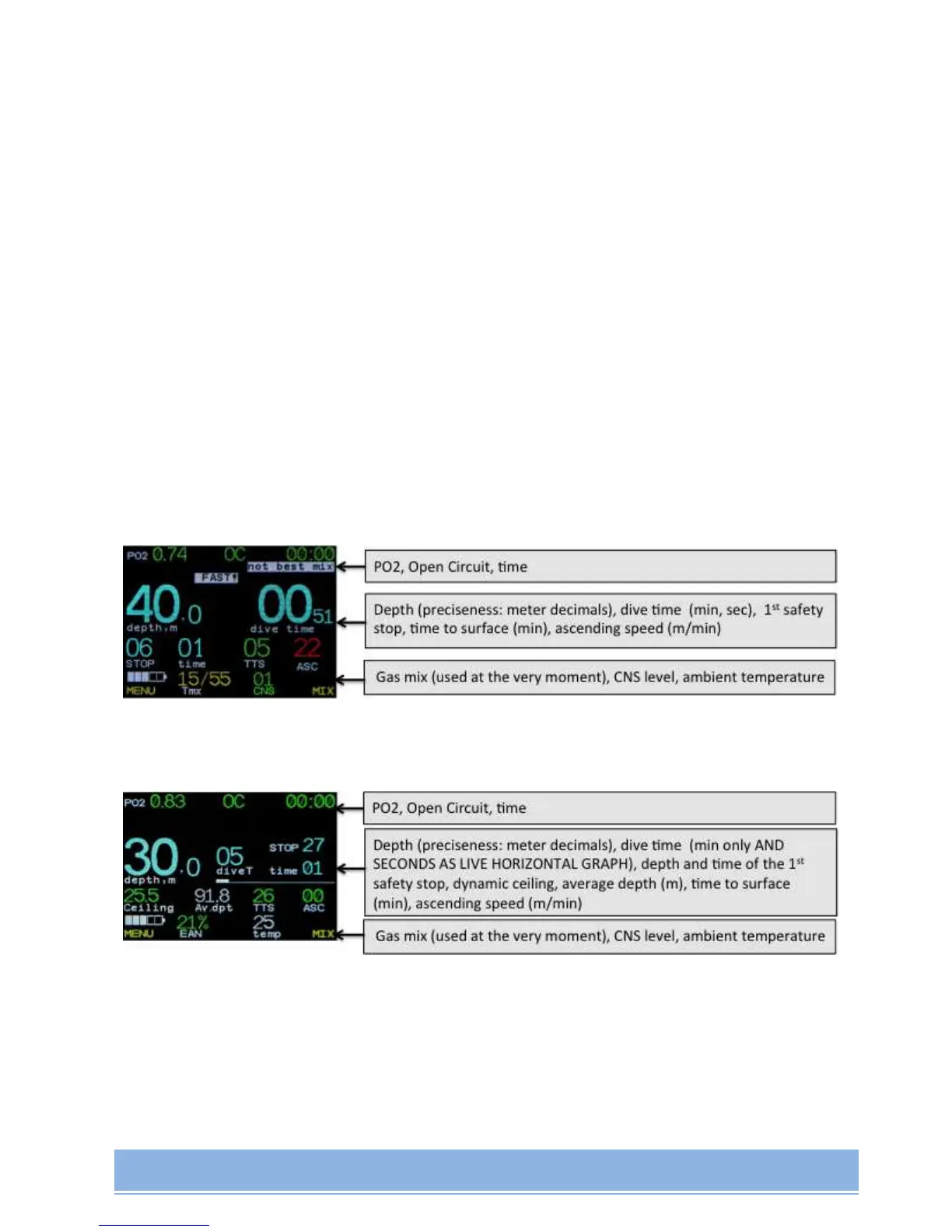
Below is Basic screen, non-decompression mode, Open Circuit.
Switching between screens in Dive Mode can be made by simultaneous pressing of both
buttons in circular order:
Screen 1 -> Screen 2 -> Compass -> Screen 1, etc.
Alternative screen, non-decompression mode, Open Circuit:
where
PO
2
– partial Oxygen pressure at current depth
OC (CCR) – Open Circuit / Closed Circuit mode
00:00– current time
HI PO
2
(LOPO
2
) – high (low) PO
2
. System warning, recorded in the logbook.


 To Next Page