The built-in VeExpress client downloads the uncompressed tx300s-veex.tar.gz upgrade package directly to the root of the
memory stick attached to the test set, so the System software upgrade process can be started right away.
Go back to TOC
5.5.2 Module Software Upgrade Procedure
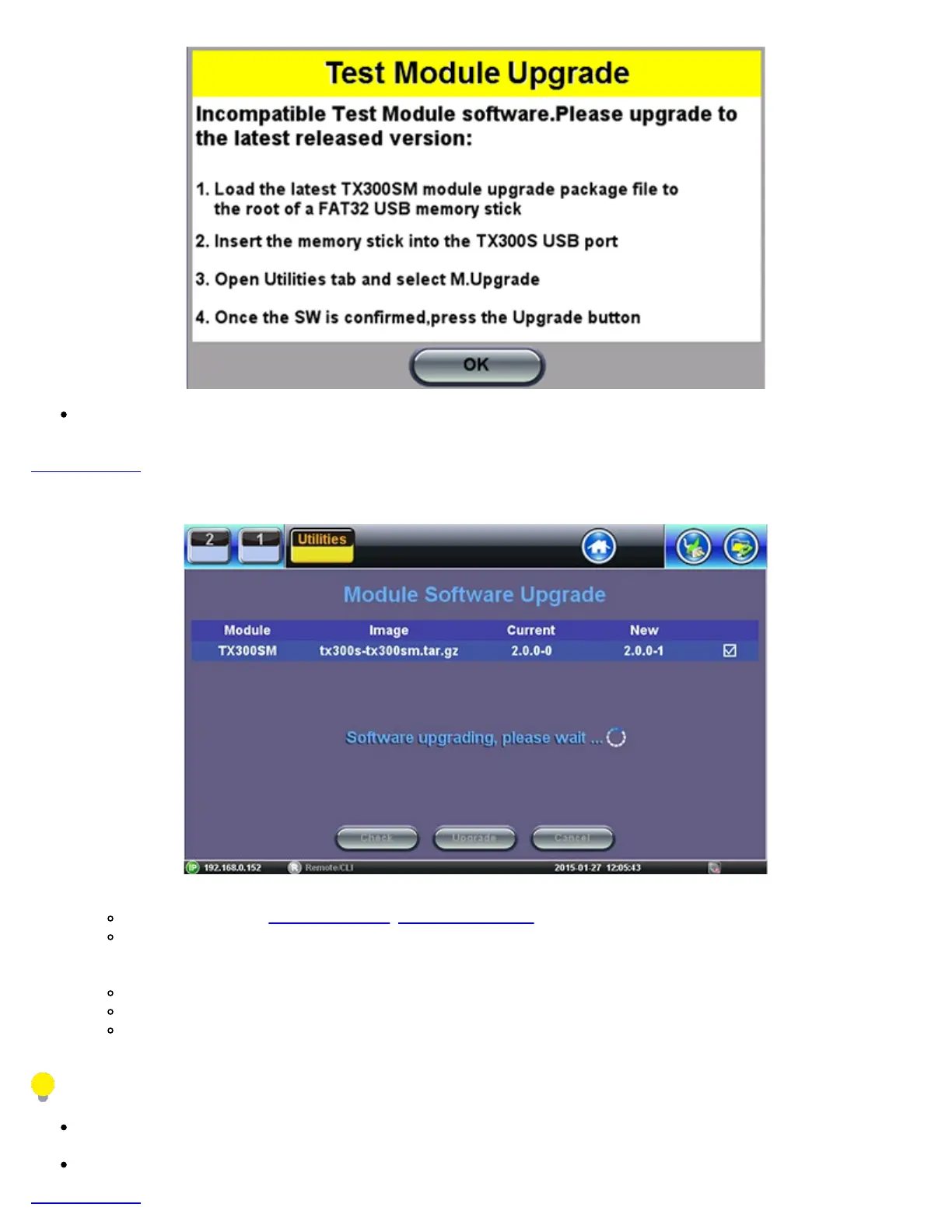
1. Obtain the required tx300s-300sm.tar.gz, tx300s-320sm.tar.gz and/or tx300s-OTDR.tar.gz/em>, upgrade files.
Download them from www.veexinc.com, www.v-express.com, a link provided or by using the built-in VeExpress client.
Unzip the files and copy to the root of a FAT32 USB memory stick if necessary.
2. Insert the memory stick to the USB port located on the left-side of the unit.
3. Initiate Software Upgrade process.
Open the Utilities section Go to >Utilities >M.Upgrade.
Select new version and press Upgrade.
The test set turns itself OFF at the end.
4. The test applications are up-to-date.
The built-in VeExpress client downloads the uncompressed tx300s-xxxx.tar.gz upgrade packages directly to the root of the
memory stick attached to the test set, so the M.Upgrade process can be started right away
The process may need to be repeated if two different blade types are loaded.
Go back to TOC
TX300s_Platform_Manual_RevB00



 To Next Page