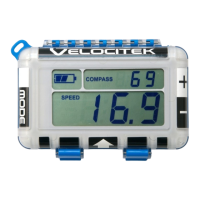
Configuration
The ProStart has four user configurable settings:
• Direction Output (Heading / COG)
• Race Bar Graph (Heel / Shift)
• Compass damping
• Heading Offset
• Magnetic Declination
• Bow offset (b OFFSEt)
• DTL Precision (0 / 0.0) (diStancE PrEciSion)
• DTL (On / Off) (diSt to LinE)
• Bonus Mode (On / Off) (bonuS ScreEEn)
• Bonus Mode (Top and Bottom Metrics)
• Bonus Mode (Bar Graph Metric)
Configuring your ProStart
To enter user setup and configure your device, press and hold RESET for 3 seconds.
In each of the config menu pages the PIN and RC Buttons are used to change the current setting being
configured. For example; while setting declination, pressing the RC Button will increase declination, and
pressing the PIN button will decrease declination.
Pressing the GUN button will save the current setting and progress to the next configuration menu (or
exit if you are on the last config page).
Pressing RESET at any time will exit the configuration menus. Pressing RESET will exit the configuration
menu without saving the menu currently displayed; however, all previous configurations settings will
be saved.


 To Next Page