How to use Shift Tracking
While sailing a close-hauled course upwind the shift tracking feature will give a measure of how much
you are being lifted (wind is shifting towards the stern of the boat), knocked (wind is shifting towards the
bow of the boat), or sailing a straight course. This assumes that you are sailing your boat at a consistent
angle to wind, i.e. the wind is dictating your heading.
The trim angle will automatically reset every time you tack. If you sail a relatively steady course after you
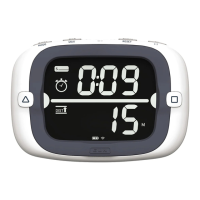
tack, you’ll see a new trim angle is set when the arrow appears at the top of your display. From this point
on - until you deviate from this course by more than 45°) the bar graph will show segments to the right
of the arrow if your heading is deviating to starboard of the ‘trim angle’ and to the left if your heading is
deviating to port.
Now let’s say you just tacked onto port tack, once your new heading angle is stable the trim angle will be
set to your new heading and you’ll see the arrow display. From this point on - assuming you are steering
your boat to maintain a constant angle to the wind - any heading deviations displayed on the bar graph
can be assumed to be wind shifts. So, if you notice one bar segment displayed to the right of the arrow,
then 2, and eventually 3, you can assume that you are now getting knocked between 9°-12° (3 segments
at 3°/segment), and you may want to consider tacking to take advantage of the lift on starboard if your
position on the course allows. Conversely, if you see 3 segments showing up to the left of the arrow
while on port tack you can assume you are being lifted between 9°-12°


 To Next Page