25
EN
4. Get to Know Your Bike
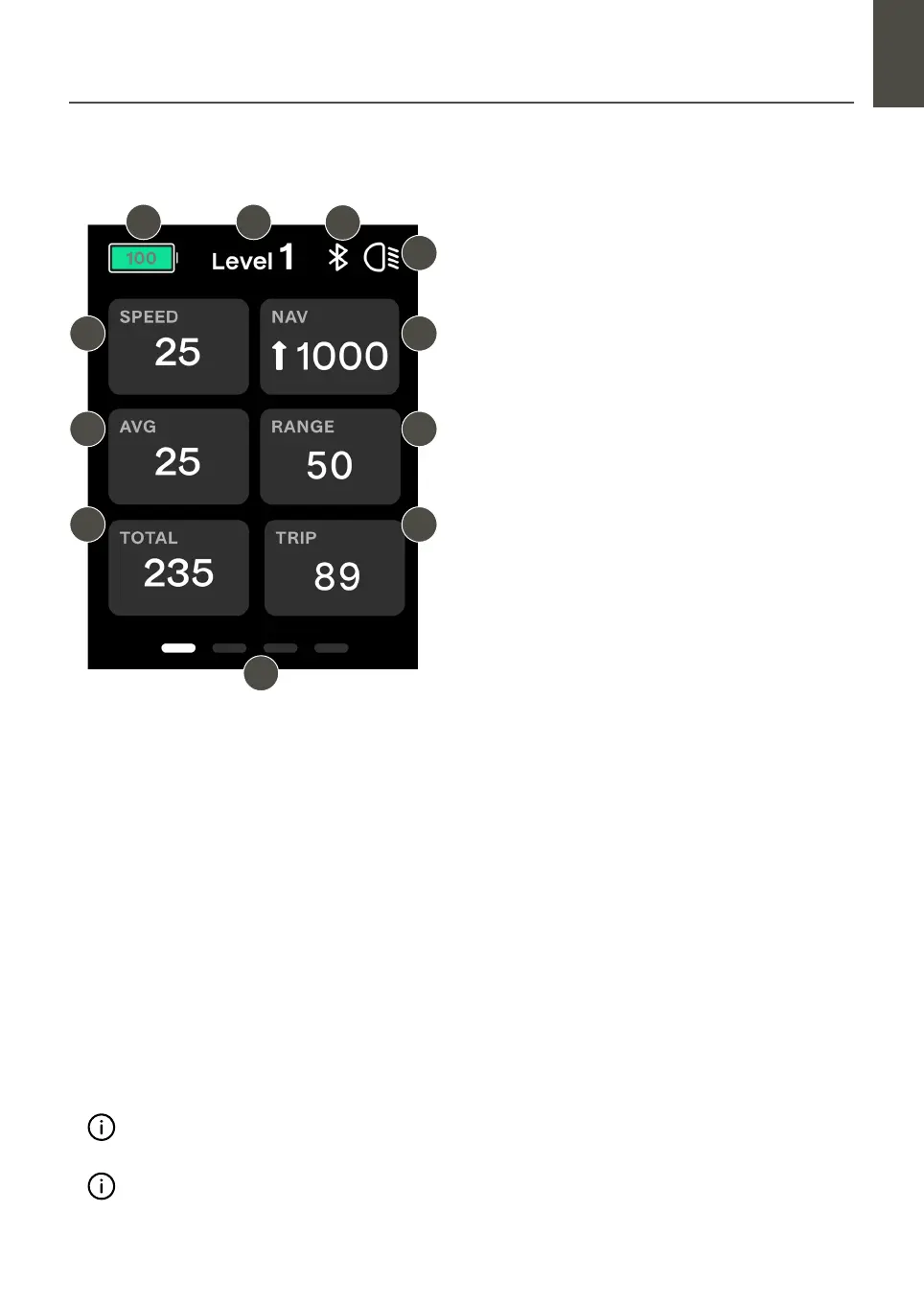
1. Baery level
2. Motor assistance level :
Go from level 0 to Superhero
3. Connected with the App :
A Bluetooth connection with the Velorei App is only possible when
your bike has been registered to your Velorei account and you are
close enough to the bike.
4. Precision light on/o :
Hyperbolic front and rear lights are always on and can’t be turned o.
5. Navigation directions
Works in combination with Velorei App.
Indicates the distance you can ride with your baery level. Keep in mind that the baery range can be highly impacted by carrier weight,
weather conditions, tires pressure, etc.
6. The distance possible to ride, based on your baery range (KM/h) :
Calculation between turning the bike on and o.
7. The distance possible to ride, based on your baery range (KM/h) :
8. Screens in display :
Use Control buon 2 to swipe
10. Average speed during ride (KM/h) :
Calculation between turning the bike on and o.
11. Actual speed (KM/h)
9. Total distance (KM)
1 2
3
4
5
6
7 9
8
10
11
Display Features
It’s not possible to change motor assistance levels on the Enviolo / cadence seing screen and vice versa.
Distances can only be showed in KM metric system.


 To Next Page