22
0900-5165 REV-00
DEVICE
Use the Device Settings menu to see hardware and software information, upgrade the monitor software, and
see or export usage statistics.
• To congure Administration settings, from the Home screen, tap the More button, tap the Settings
button, and then tap Administration.
Table 10. Device Settings Menu
MEDIA MENU TREE SETTING
Device Information — Displays hardware and software information.
Software Upgrade Software Upgrade
Displays the current software version and the software version
on a connected USB drive.
Connect a Software Upgrade USB drive to the monitor, tap
Upgrade, and then tap Yes. Do not disconnect the drive
while the software is updating. Once the software upgrade is
complete, shut-down the monitor.
Usage Statistics Usage Statistics
Displays usage statistics. Connect a USB drive to the monitor,
and then tap Export to save the usage statistics to the drive.
Service Log —
The service log contains information for troubleshooting
device errors. This information can only be exported by
Verathon service representatives.
Procedure 5. Insert the Video Baton into the Stat (Optional)
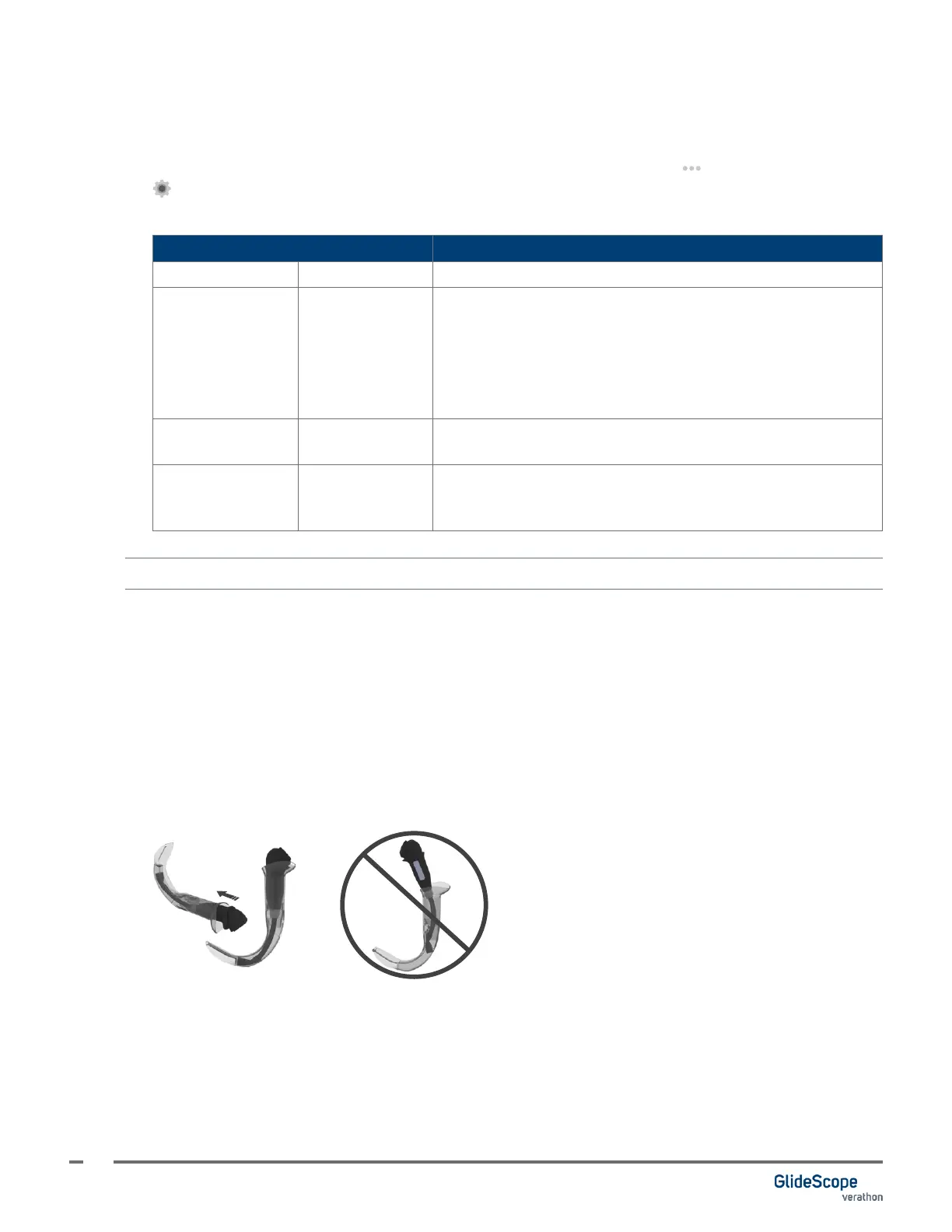
If you are using a video baton and a GVL Stat, attach the Stat to the baton before you connect the baton to
the monitor.
1. Open the GVL Stat pouch, but do not remove the Stat from the packaging.
2. Ensure that the logo on the side of the baton and the logo on the side of the Stat are aligned.
3. Slide the video baton into the GVL Stat until it clicks into place. Do not remove the Stat from the pouch
until you are ready to begin the intubation. This helps ensure that the blade remains as clean as possible
until you are ready to use it.
Note: Ensure that you do not insert the video baton backwards.
Correct
Incorrect
4. When you remove the GVL Stat from the packaging, visually inspect the Stat to ensure that all exterior
surfaces are free of unintended rough areas, sharp edges, protrusions, or cracks.
5. If desired to provide additional anti-fog benets, you may apply Dexide Fred Lite to the camera window
on the Stat.
*
Use the solution according to the manufacturer’s instructions.
* Compatibility has been demonstrated for up to one hour of continuous exposure on video batons and Stats.













 To Next Page