SETUP
Installing or Replacing MSAM Cards
V200
C AND V400C INSTALLATION GUIDE 21
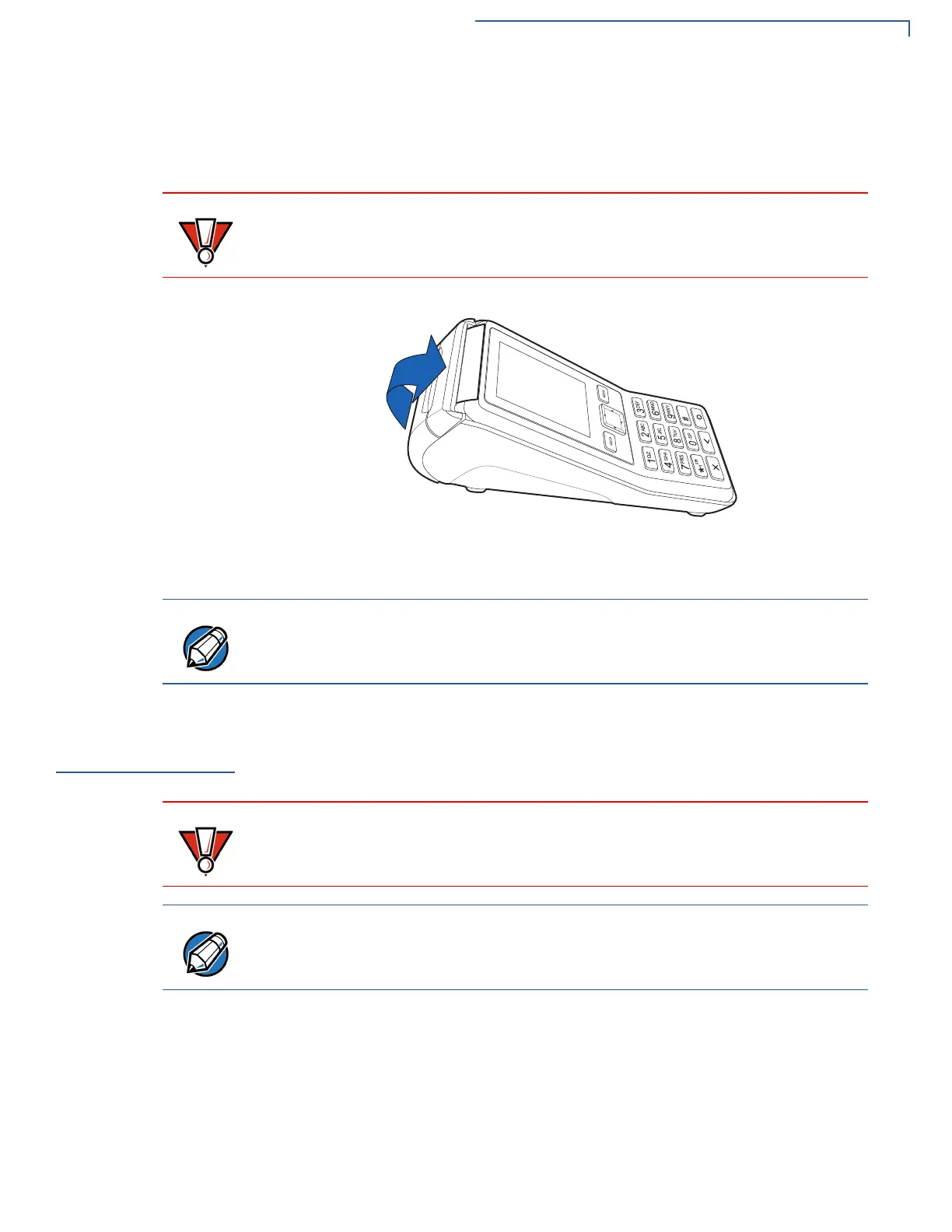
7 Close the paper roll cover by gently pressing directly on the cover until it clicks
shut, allowing a small amount of paper past the glue residue to extend outside
the printer door (see Figure 8).
Figure 8 Closing Paper Roll Cover
8 Tear the paper off against the serrated strip.
Installing or
Replacing MSAM
Cards
When you first receive your terminal, you may need to install one or more MSAM
cards or you may need to replace old cards.
Installing or replacing
MSAMs
1 Remove the power pack from the power outlet.
2 Place the terminal upside down on a soft, clean surface to protect the display
from scratches.
To prevent the paper roll cover from damaging the print roller, always gently
press down on the printer dust cover to close it.
For paper ordering information, refer to Accessories and Documentation.
Observe standard precautions when handling electrostatically sensitive devices.
Electrostatic discharges can damage this equipment. Verifone recommends
using a grounded anti-static wrist strap.
Verifone ships variants of the V200c and V400c terminals for different markets.
Your terminal may have different features described in this section.








 To Next Page