11
2-1-2-3. Switch Cascading in Topology
• Takes the Delay Time into Account
Theoretically, the switch partitions the collision domain for each port in the switch so that you may
up-link the switches unlimitedly. In practice, the network extension (cascading levels & overall diameter)
must follow the constraint of the IEEE 802.3/802.3u/802.3z and other 802.1 series protocol specifications,
in which the limitations are the timing requirement from physical signals defined by 802.3 series
specification of Media Access Control (MAC) and PHY, and timer from some OSI layer 2 protocols such
as 802.1d, 802.1q, LACP and so on.
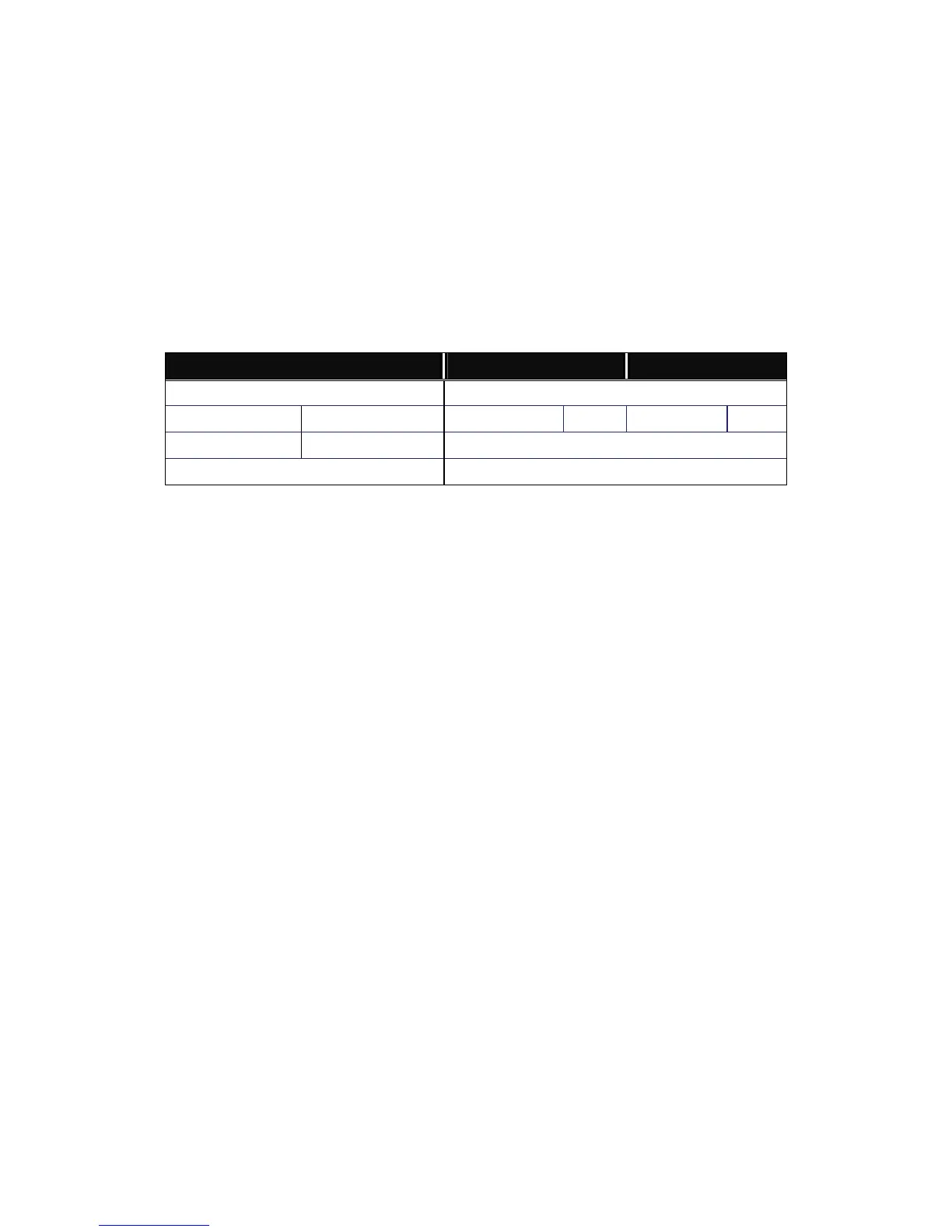
The fiber, TP cables and devices’ bit-time delay (round trip) are as follows:
1000Base-X TP, Fiber 100Base-TX TP 100Base-FX Fiber
Round trip Delay: 4096 Round trip Delay: 512
Cat. 5 TP Wire: 11.12/m Cat. 5 TP Wire: 1.12/m Fiber Cable: 1.0/m
Fiber Cable : 10.10/m TP to fiber Converter: 56
Bit Time unit : 1ns (1sec./1000 Mega bit)
Bit Time unit: 0.01μs (1sec./100 Mega bit)
Table 2-2
Sum up all elements’ bit-time delay and the overall bit-time delay of wires/devices must be within
Round Trip Delay (bit times) in a half-duplex network segment (collision domain). For full-duplex operation,
this will not be applied. You may use the TP-Fiber module to extend the TP node distance over fiber optic
and provide the long haul connection.
• Typical Network Topology in Deployment
A hierarchical network with minimum levels of switch may reduce the timing delay between server
and client station. Basically, with this approach, it will minimize the number of switches in any one path;
will lower the possibility of network loop and will improve network efficiency. If more than two switches are
connected in the same network, select one switch as Level 1 switch and connect all other switches to it at
Level 2. Server/Host is recommended to connect to the Level 1 switch. This is general if no VLAN or other
special requirements are applied.



 To Next Page