Vertiv | Liebert® DM | User Manual 68
Microprocessor Controller
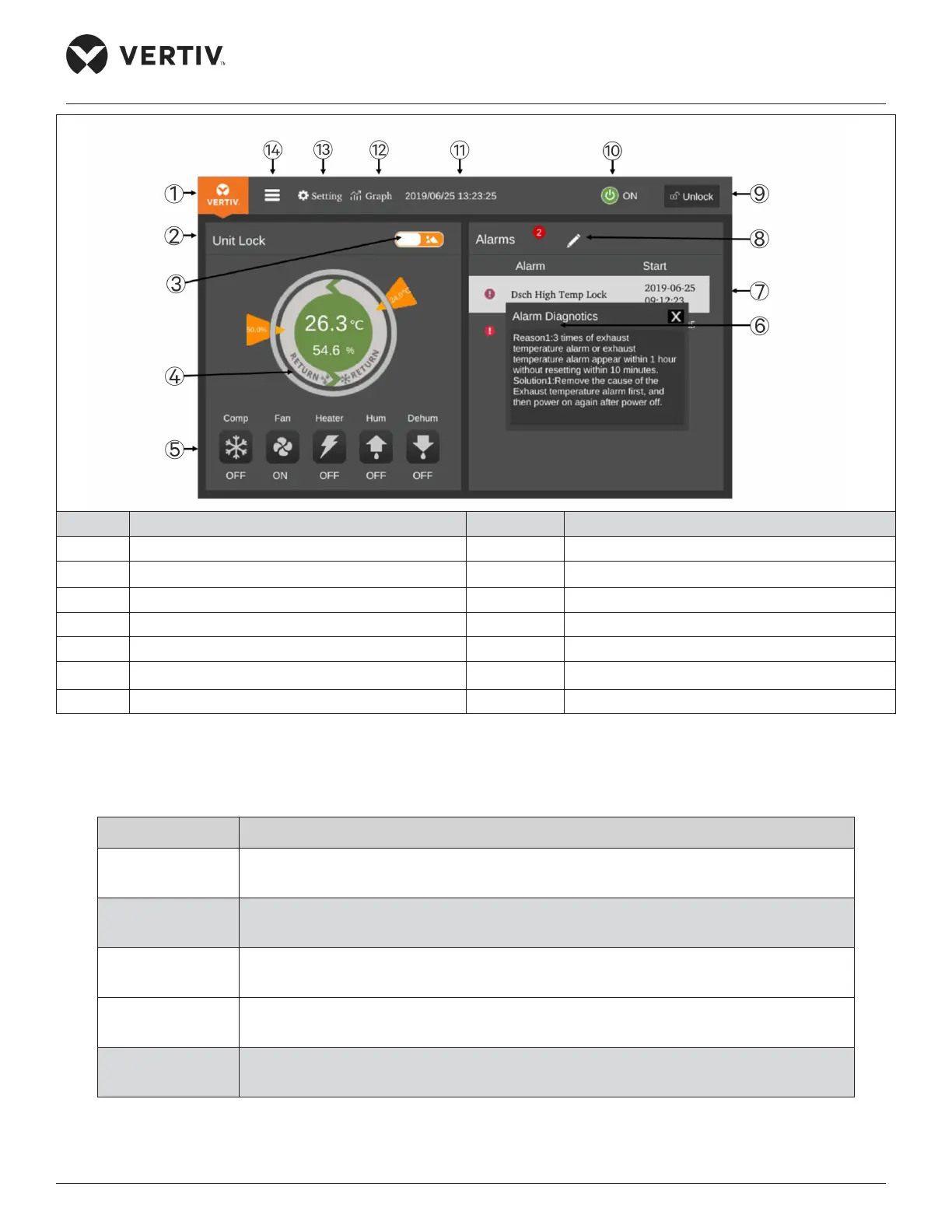
No. Description No. Description
1 Home button 8 Toggle button 2
2 Operating status 9 Unlock button
3 Toggle button 1 10 On/O button
4 Control mode 11 Date and Time display
5 Status display 12 Graph button
6 Alarm diagnosis 13 Setting button
7 Real-time data 14 Menu button
Figure 5-2 Display Screen Interface - Unlocked
The function of each touch key on the interface is described in Table 5-2.
Table 5-2 Menu Description
Touch key Description of Functions
Menu button Click this button to display the main menu page to enter each sub-menu.
Home button
Click this button to display the homepage to view the main data and status of the
system.
Settings button
Click this button to enter the temperature and humidity setting page, in which user can
set the temperature and humidity settings of the system.
Graph button
Click this button to enter the graph interface to view the return air temperature graph
and the return air humidity graph.
Date and Time
display
Show current date and time.










 To Next Page