Vertiv | Liebert® DM | User Manual 88
Outdoor Fan Speed Controller (Only for 22 kW/27 kW)
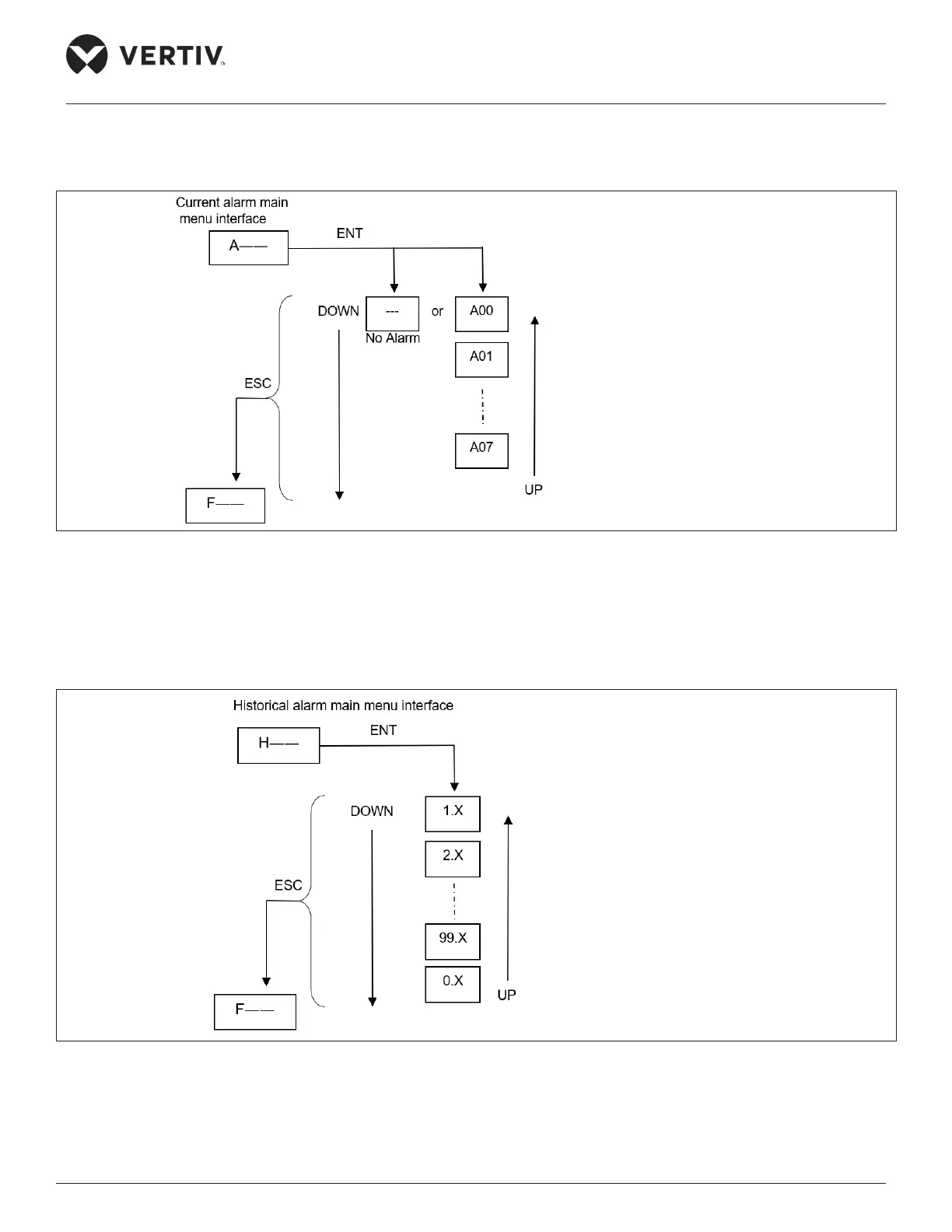
When the current main menu is the active alarm value main menu identifier “A--”, press the ENT key to enter the active alarm
value menu interface. The switching operation process and sequence of active alarm value menu are shown in Figure 6-6.
Refer Table 8-2 for the conditions and troubleshooting of alarm generation.
Figure 6-6 Active Alarm Value Main Menu
• Historical alarm value main menu interface
When the current main menu is the historical alarm value main menu identifier “H--”, press the ENT key to enter the
historical alarm value menu interface. The switching operation process and sequence of historical alarm value menu are
shown in Figure 6-7.
Figure 6-7 Historical Alarm Value Main Menu
A00: Input phase loss alarm
A01: SCR over temperature
A02: Fan 1 over temperture
A03: Fan 2 over temperture
A04: Pressure sensor failure
A05: EEPROM read failure
A06: SCR temperture sensor failure
A07: Frequency anomaly
0: Input phase loss alarm
1: SCR over temperature
2: Fan 1 over temperature
3: Fan 2 over temperature
4: Pressure sensor failure
5: EEPROM read failure
6: SCR temperture sensor failure
7: Frequency anomaly










 To Next Page