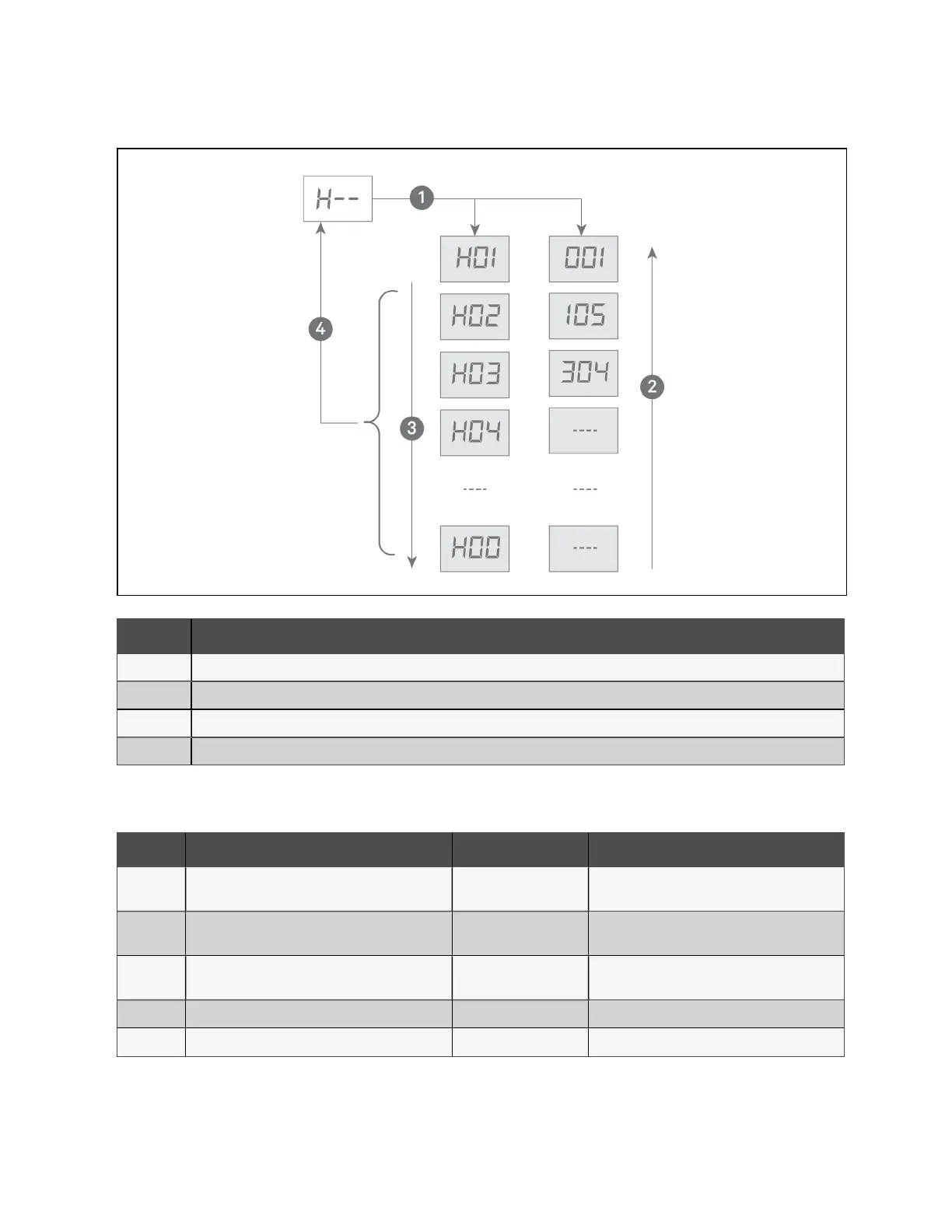
Figure 10.11 History Alarms Menu
Item Description
1 Pressing ENT displays the history alarm item(s), which alternately displays the sequence number and the alarm ID.
2 Pressing up arrow, cycles up through the sequence numbers.
3 Pressing down arrow, cycles down through the sequence numbers.
4 Pressing ESC returns to the history alarms menu.
Alarm ID Meaning Possible Cause Handling Method
000 CAN communication failure
Communication circuit
missing or damaged.
Check communication circuit. Ignore alarm on
condensers without CAN connections.
001 Ethernet communication failure
Ethernet hardware or
connection failure
Ignore alarm, Ethernet connection is not present.
002 USB communication failure
USB device or file is
damaged.
Replace USB device or file.
003 Data corruption Memory chip is damaged. Replace PCB board.
004 System error Internal error Reboot. If reboot fails, consult factory.
Table 10.3 System Alarm Information
46 Proprietary and Confidential ©2024 Vertiv Group Corp. 10 Control Operation
Vertiv™ Liebert® MCV Installer/User Guide



 To Next Page