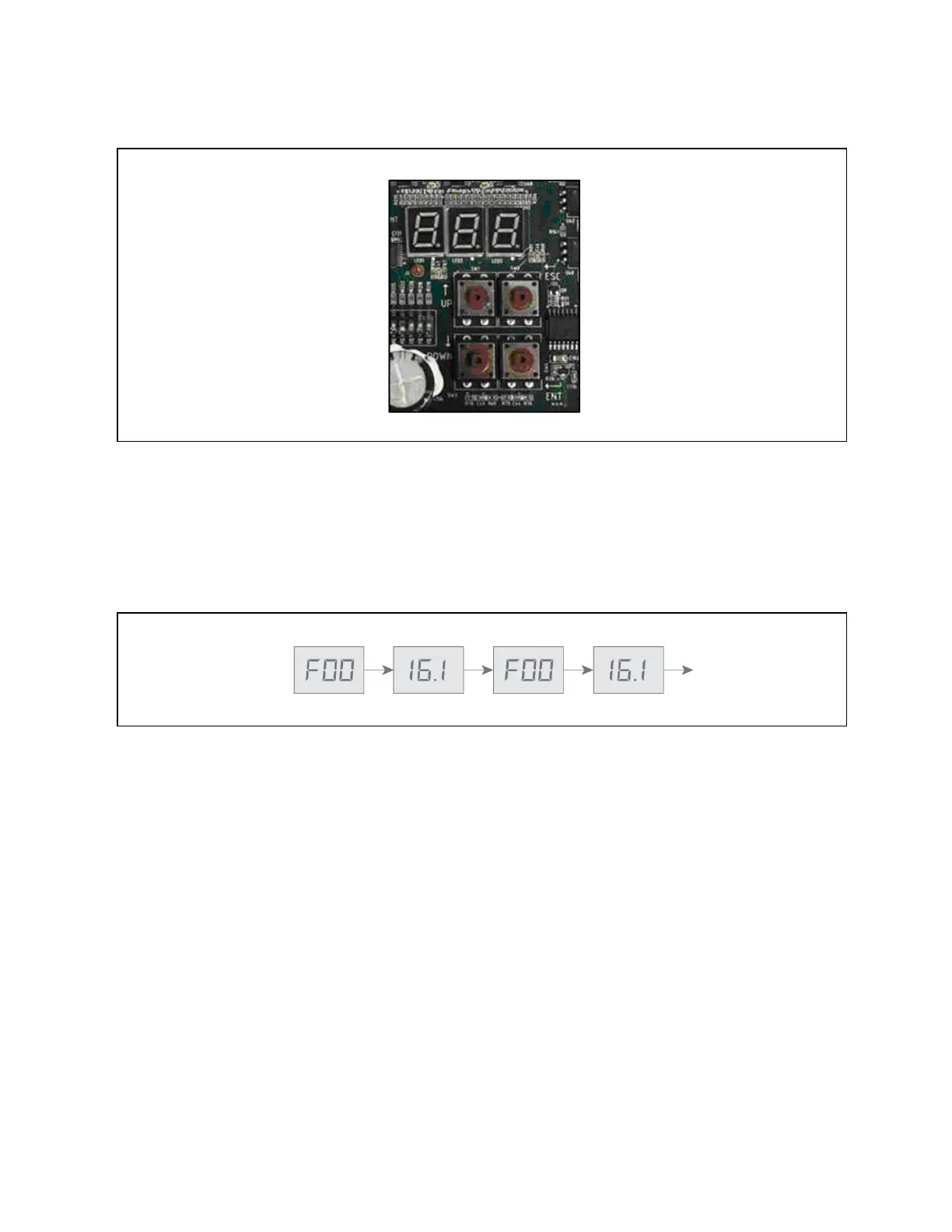
Figure 10.6 Control Board HMI
10.4.1 Initial Display upon Power On
After power on, first item of the analog signals menu displays. F00 and the pressure value of condenser 1 display alternately.
F00 is the item ID of Condenser Pressure 1, see Table 10.2 on page44, for the description of the analog signal item IDs.
Figure 10.7 below, shows the alternating ID and example compressor 1 pressure of 16.1.
Figure 10.7 Initial Display on the Controller
10.4.2 Navigating the Controller Interface Main Menu
At the initial display, press ESC to display the first item of the main menu, which includes four options:
• Analog Signals Menu
• Active Alarms Menu
• History Alarms Menu
• Configuration Menu
Use the Up and Down keys to scroll through the menus, and press ENT to enter the sub menus. Figure 10.8 on the next
page,shows the operation and structure of the main menu.
10 Control Operation Proprietary and Confidential ©2024 Vertiv Group Corp. 41
Vertiv™ Liebert® MCV Installer/User Guide



 To Next Page