10.4.3 Analog Signals Menu
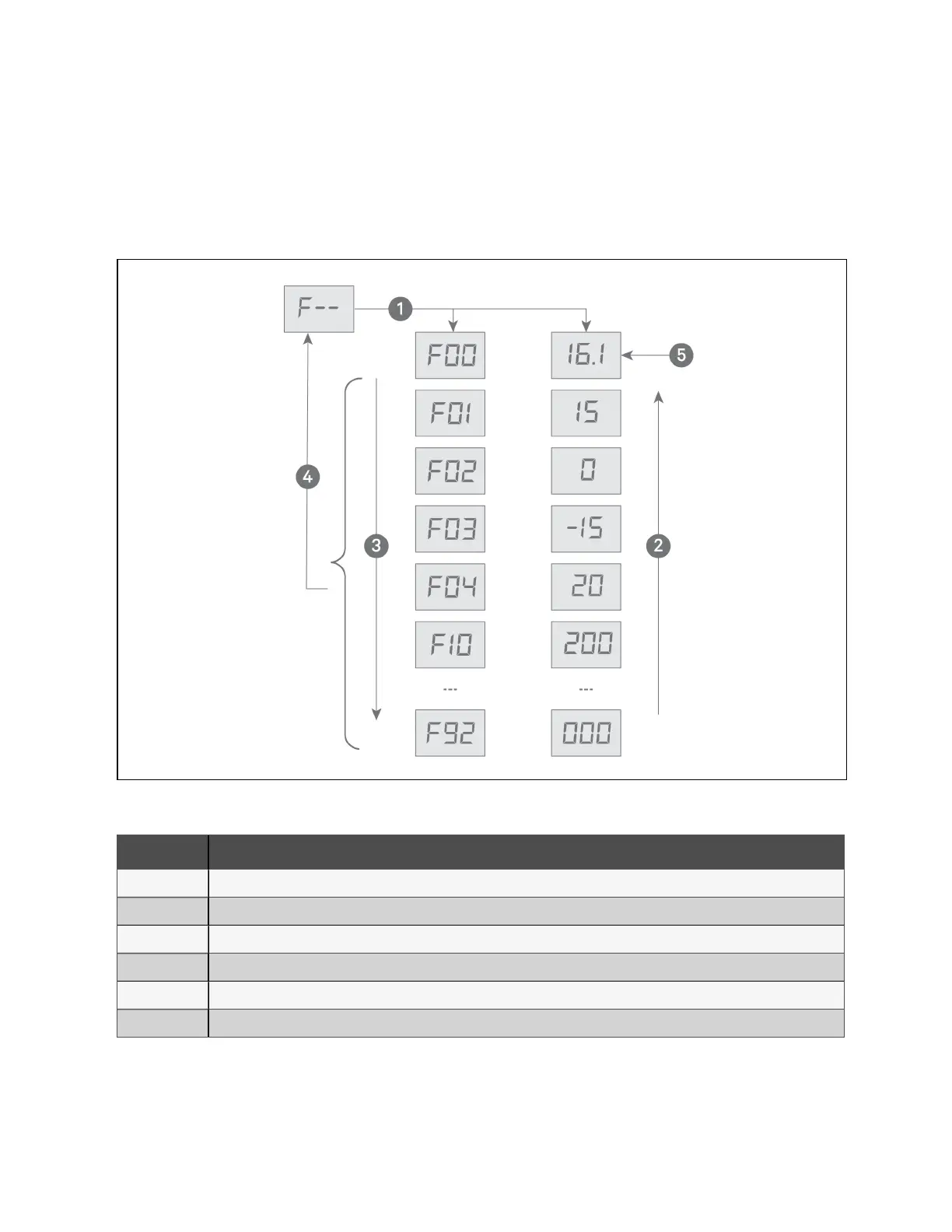
In the analog signals menu, F––, press ENT to enter the analog signal items described in Table 10.2 on the next page. The
item ID and signal value display alternately. Figure 10.9 below, shows the operation and item structure of analog signals
menu.
Figure 10.9 Analog Signals Menu
Item Description
1 Pressing ENT displays the first analog signal item which alternately displays the ID and the reading.
2 Pressing up arrow, cycles up through the menu items/readings.
3 Pressing down arrow, cycles down through the menu items/readings.
4 Pressing ESC returns to the analog signals menu.
5 Initial screen, item F00 with example 16.1 reading.
6 Down from configuration menu displays the analog signals menu.
10 Control Operation Proprietary and Confidential ©2024 Vertiv Group Corp. 43
Vertiv™ Liebert® MCV Installer/User Guide



 To Next Page