AHD DVR User Manual
6
Connecting Additional Devices
2.4 Installation Connections Sketch Map
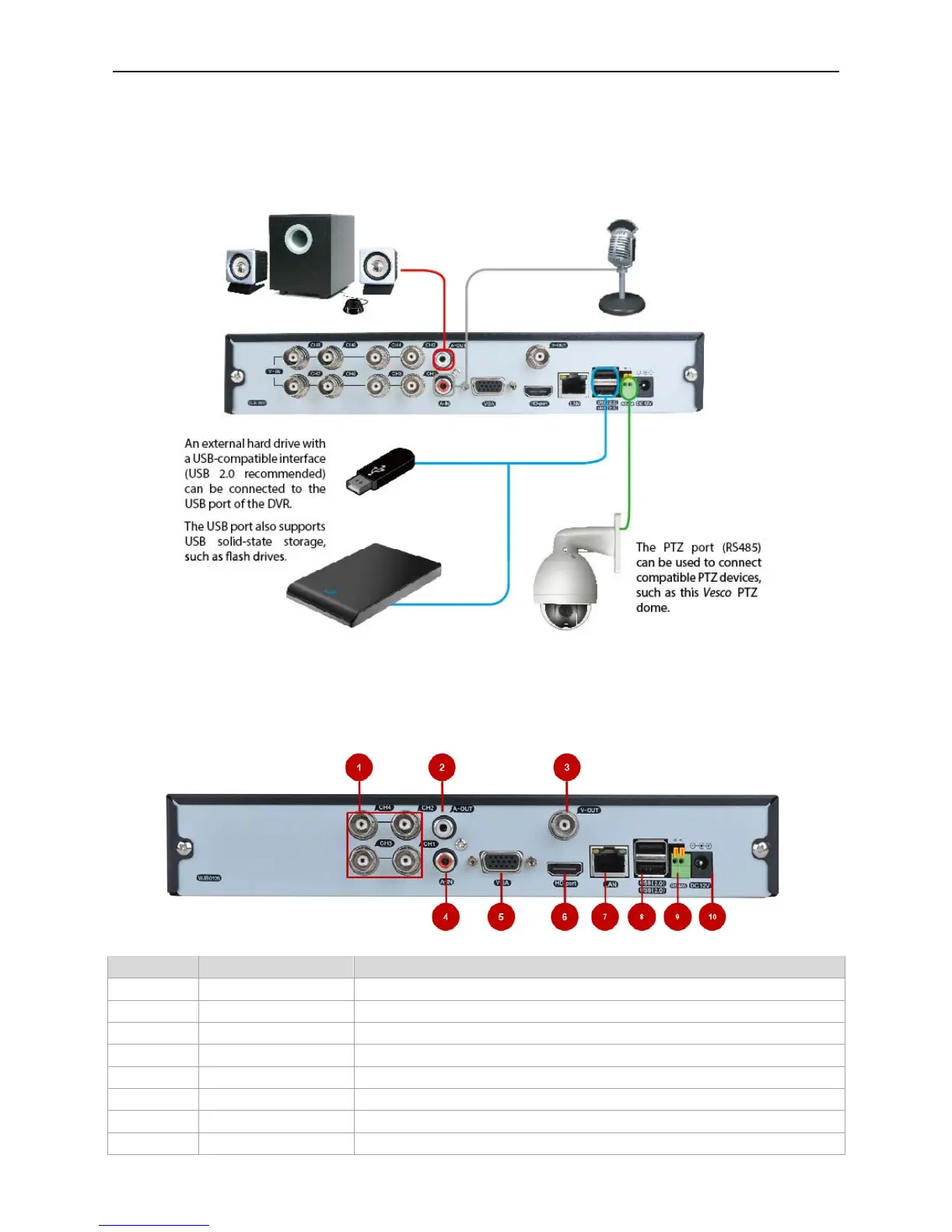
The Rear Panel of the DVR
4-CH DVR
ITEM NAME FUNCTION
1 VIDEO IN Video input from up to 4 cameras
2 AUDIO OUT BNC Audio output for amplified speaker
3 VIDEO OUT BNC connector for TV or Monitor
4 AUDIO IN Audio input
5 VGA VGA output for 19" or larder monitor
6 HDMI HDMI video output
7 LAN Network(ethernet) port
8 USB PORTS 2 USB 2.0 for mouse and external UBS backup
The Audio Output can be used to connect
stereo speakers, headphones or other external
sound device.
The Audio ports can be used to connect audio devices to
the DVR. Obviously, your microphone probably won't look
like that one - they're often built into cameras.



 To Next Page