AHD DVR User Manual
12
3.3.3 PTZ Control
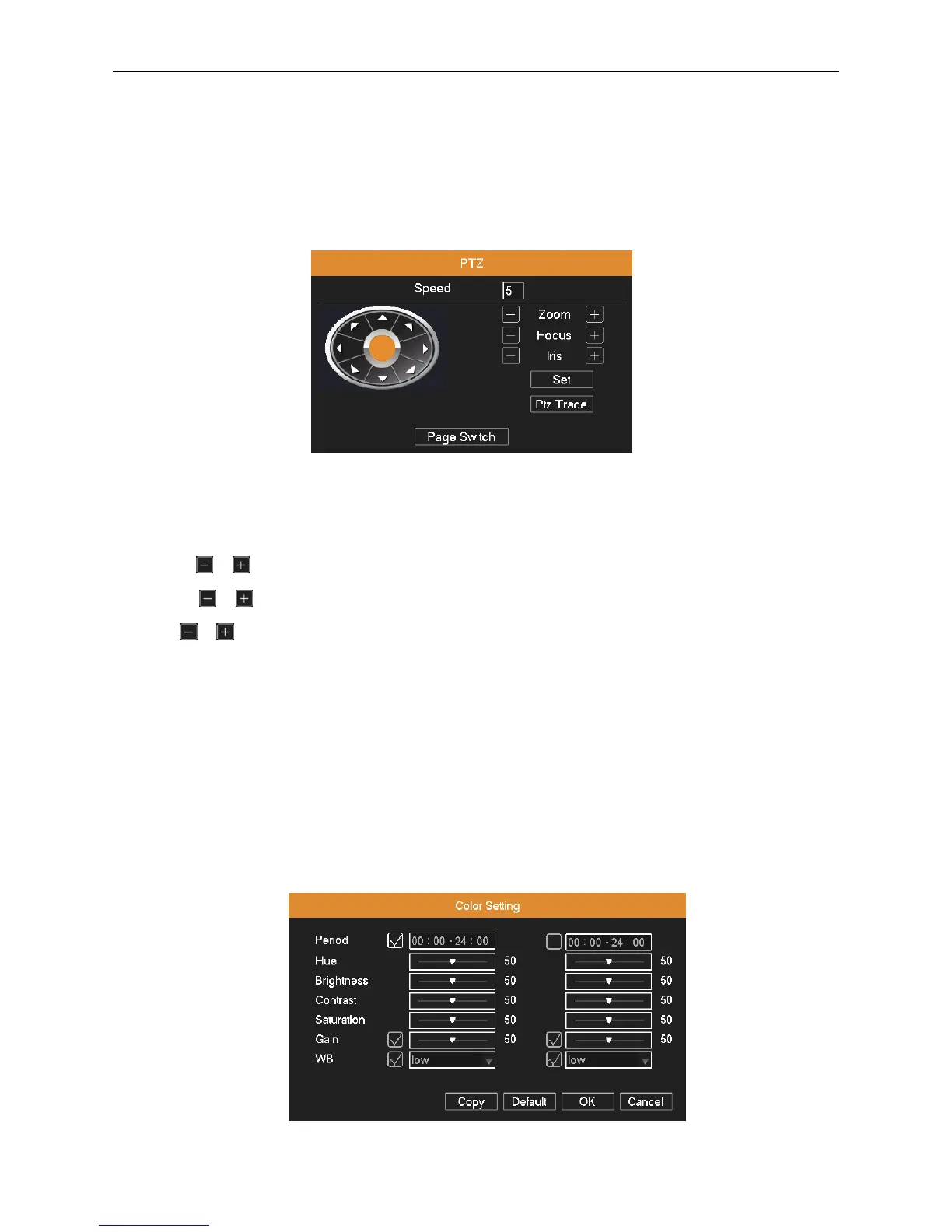
Operation interface is as followed. The functions include: PTZ direction control, step, zoom, focus, iris, and set up trace,
preset, tour, pattern, auto scan, auto pan and so on.
Note : 1. Decoder 485+、485- line connects with DVR 485+、485- line. The connection is right.
2. Click “Main Menu”“System”“PTZ” to set the PTZ parameters.
3. The PTZ functions are decided by the PTZ protocols.
Picture 3.7 PTZ Control
Speed: Set the PTZ rotation speed. Default range: 1 ~ 8.
Direction control: Control the PTZ rotation. 8 directions control is supportive. (4 directions in Front panel is supportive).
Zoom: Click / button to adjust the zoom multiple of camera.
Focus: Click / button to adjust the focus of camera.
Iris: Click / button to adjust the iris of camera.
PTZ Trace: To full-screen show the channel image. Press left mouse and control PTZ to rotate orientation. Press left
mouse and then rotate the mouse to adjust the zoom multiple of camera.
Set: Enter the function operation menu.
Page Switch: Switch between different windows.
3.3.4 Color Setting
You can use the desktop shortcut menu and enter the Color Setting interface to set the selective image parameters. The
image parameters include: hue, brightness, contrast, saturation. You can set different parameters at different time sections.
Picture 3.8 Color Setting



 To Next Page