AHD DVR User Manual
17
4. Main Menu
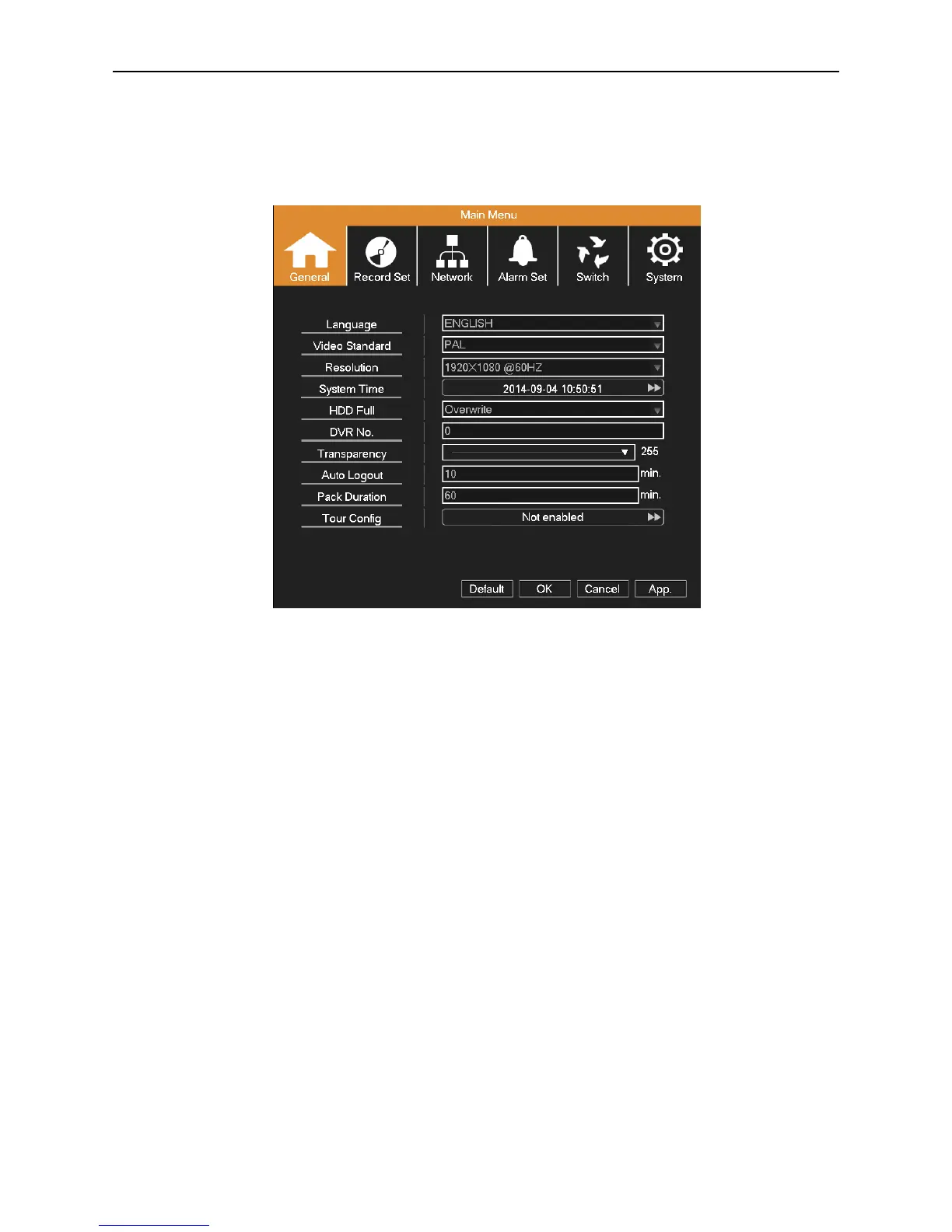
When a user logs in to the system, right click in any place, the shortcut menu will appear at the bottom of the screen, then
click the first item to enter the main menu interface. As picture 4.1 shows.
Picture 4.1 Main menu
4.1 Quick Setting
Language: Choose related operating language.
Video Standard: Set DVR’s video system (PAL or NTSC are optional).
Resolution: Set output resolution.
System Time: Set DVR’s current system date & time, time format, etc.
HDD Full: Select Stop Record: when the hard drive is full, stop recording.
Select overwrite: when the hard drive is full, overwrite the earliest recording files.
DVR No: Using it in this situation would mean to control many DVRs. Only click “ADD” on remote control and enter local
number, the related DVR can respond.
When Local No is “0”, it will response the same series DVR’s operation.
Transparency: Adjust the transparency of operating menu.
Auto Logout: If there is no any operation within the specified period, the device will automatically log out and return to
login interface.
Pack Duration: Set the time length of each video file. “60 minutes” is default value (A maximum of 90 minutes).



 To Next Page