8 Getting set up
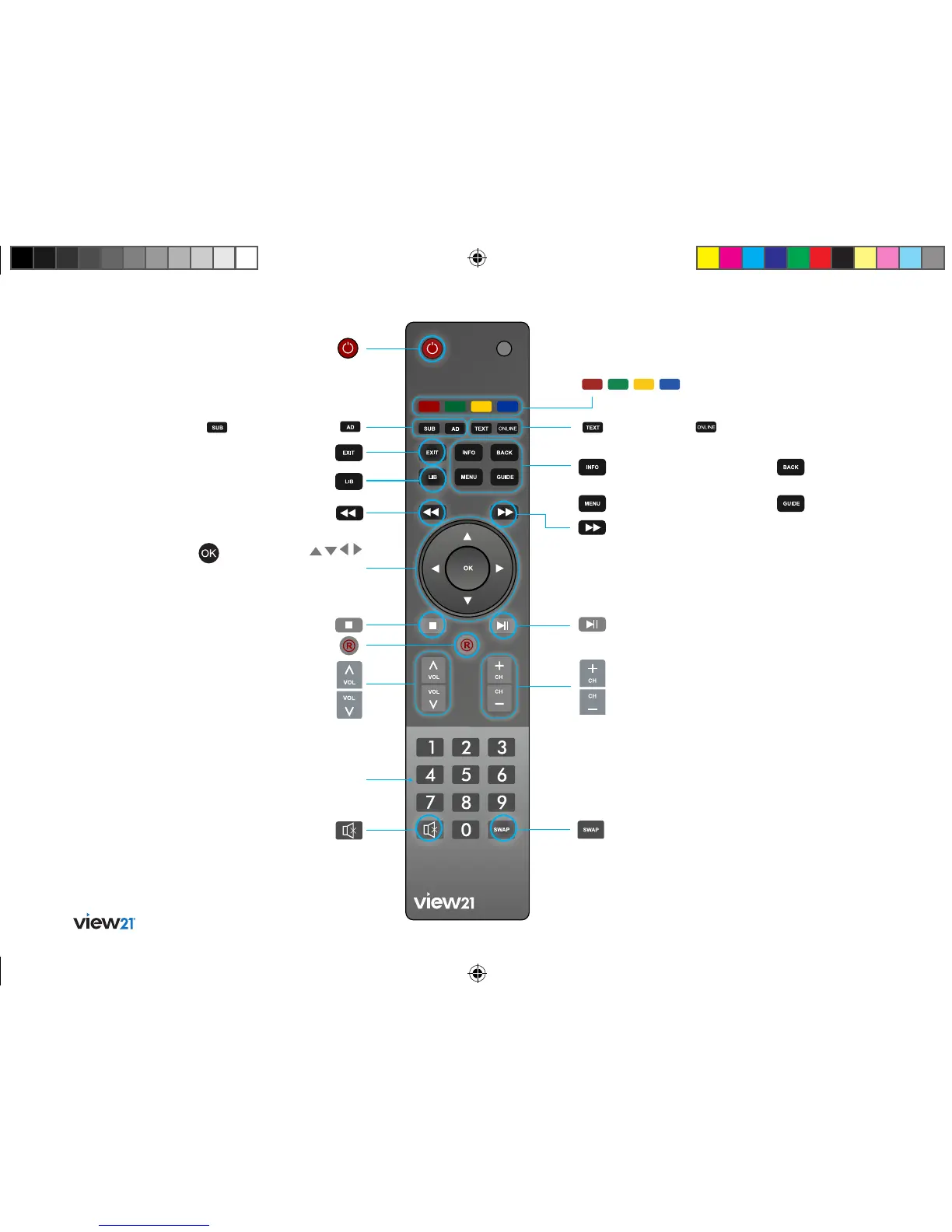
Your remote
0 – 9: Numerical keys
Navigation:
Navigate up/down/left/right in
menus/on screen displays
OK: Press to confirm
current selection
Mute: Turns
your TV sound
on/off
Guide: Display the TV
programme guide
Play/Pause: Toggle action for
recordings and Live Pause TV
Fast Forward: (1) Fast
Forward at variable speeds
(2) Step through menu bars
Back: Return to previous
menu
Record: (1) Record a programme
(2) Set a future recording
Information: Display information
about programmes and recordings
Menu: Display the Main Menu
Exit: Exit the menu
and return to live TV
Power: Switch the View21
box to standby
Swap: (1) Swap between previous and
currently watched TV channels (2) Toggle
Show/Hide of quick key buttons in menus
Text: Load text
services available
on some channels
Library: Display a library of
previously recorded programming
Rewind: (1) Fast Rewind at
variable speeds (2) Step through
menu bars
Stop: Stops recording or live
paused TV
AD: Set Audio
Description on/off
Subtitles:
Set subtitles on/off
Channels: Changes your TV channels
Volume: Changes your TV volume
Coloured Buttons:
Navigation quick keys
Online: Display the
online menu
View21_VV107ZRH_HD Digital TV Recorder_UG_V3.indd 8 11/07/2013 15:39:51



 To Next Page