Conguring Client Settings
Client Settings at a Glance
112
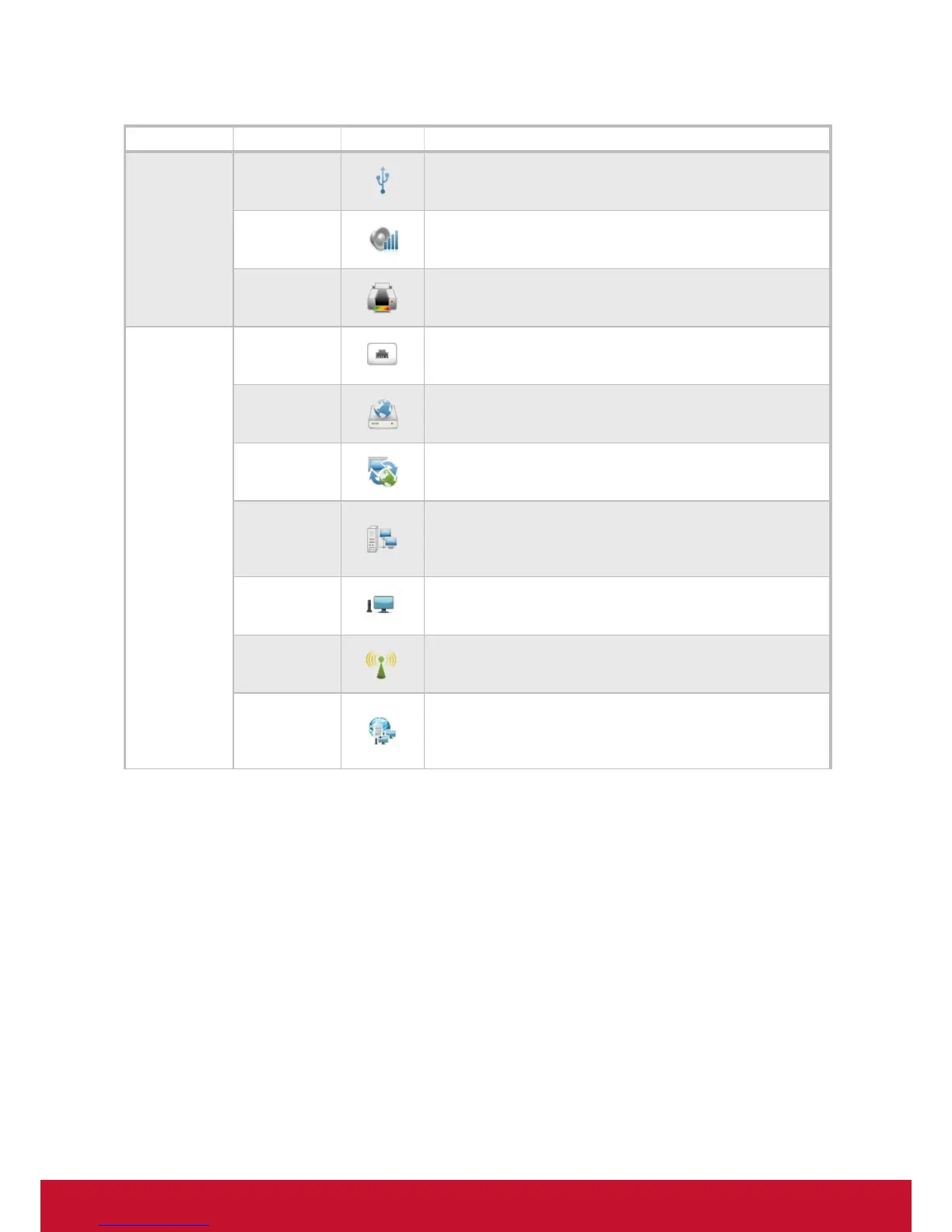
Tab Setting Icon Description
Devices
USB Storage
Click to congure settings for USB storage devices.
Audio
Click to congure settings for audio devices.
Printer *
Click to add local or network printers for your client device.
Network
Ethernet *
Click to congure your wired network settings.
PPPoE *
Click to congure PPPoE connection settings and create an
Internet connection.
VPN *
Click to congure VPN (Virtual Private Network) connection
settings and create a secure and reliable connection over the
Internet.
Hosts
Click to create the mapping of IP addresses to the names of host
servers. You can then use the name of a host server instead of
its IP address wherever you need to specify an IP address while
conguring client settings.
Host Name *
Click to change the host name of your client device.
Wireless *
Click to congure your wireless network settings and create a
wireless connection.
Proxy
Click to congure proxy settings for Web-based access to services.
The settings available here are only applicable to services that use
Web-based access, such as (Microsoft) Remote Web Access and
(Citrix) Web Logon connection types.



 To Next Page