15
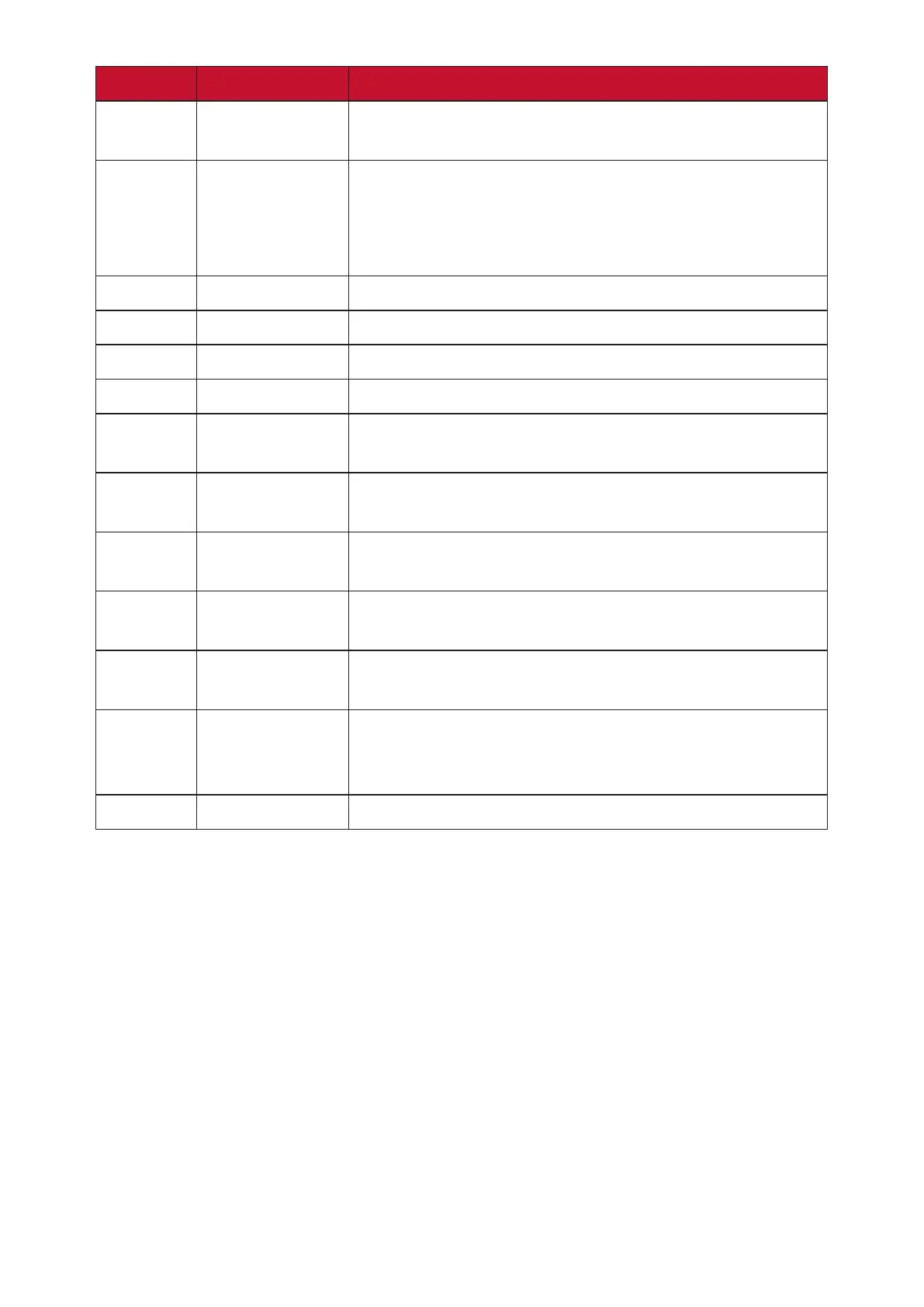
Number Port Descripon
1
USB Type-C
USB Type-C input; connect to a PC with USB Type-C
output.
2
TOUCH
• Touch signal output to external PC.
•
connected to the USB 3.0 port can directly be
used by the external PC.
3
Audio Out
Audio output to an external speaker/headset.
4
PC Line In
External computer audio input.
5
VGA
External computer video input.
6
DVI
DVI input; connect to a PC with DVI output.
7
DisplayPort
DisplayPort input; connect to a PC with DisplayPort
output.
8
HDMI
output, set-top box, or other video device.
9
RS-232
Serial interface; used for mutual transfer of data
between devices.
10
LAN
Standard RJ45 (10M/100M/1000M) Internet
11
USB 1
Connect USB devices such as hard disks, keyboard,
mouse, etc.
12
Smart USB
Connect USB devices such as hard disks, keyboard,
ViewBoard.
13
SPDIF






 To Next Page