VIMTAG IP VT 361 SECURITY CAMERA
Page
12
Connecting the Camera
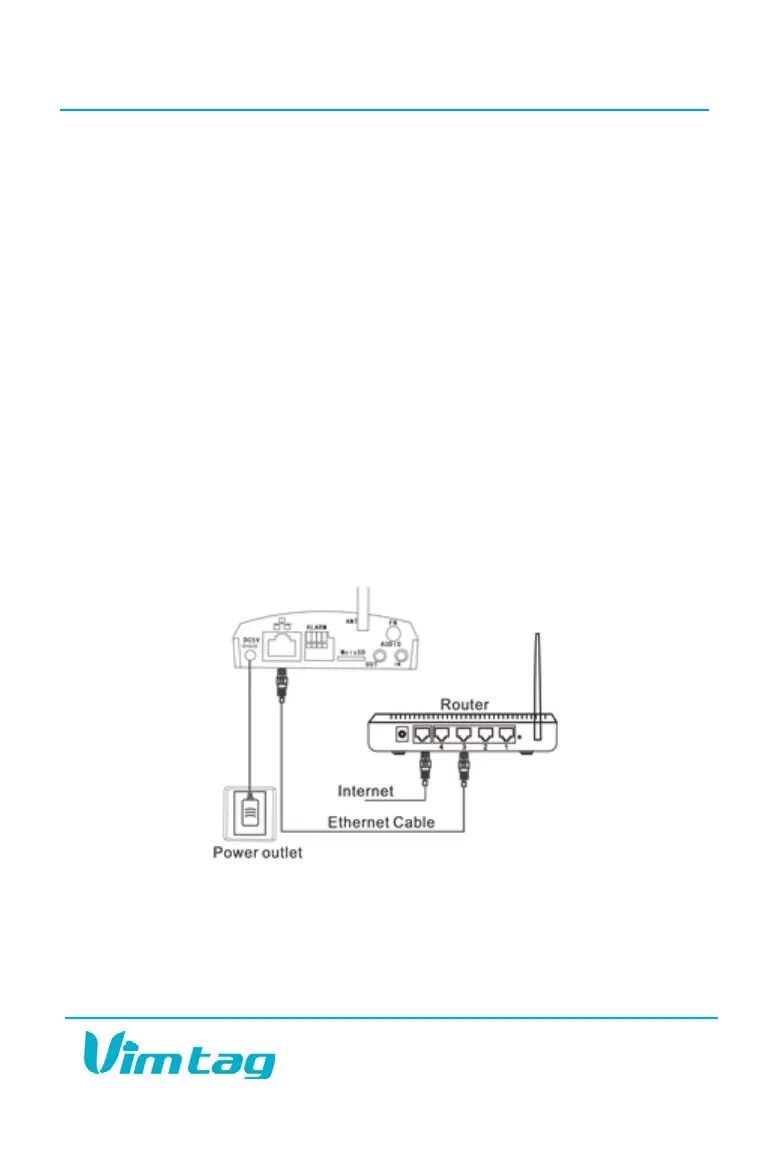
Access to the camera is accomplished with an Ethernet or Wi-Fi
connection:
ETHERNET: If you plan to use the camera through a wired connection, you
simply connect an Ethernet cable from the Ethernet interface to your
router. The camera will then show up on your network. You can go to the
Vimtag site and add the camera, using the Add a device option, to get it
started.
Wi-Fi: If you plan to connect through Wi-Fi, you will find the camera on the
network once it is hooked up and the power is turned on. You will be able
to add the camera, using the Add a device option, on the Vimtag site.
When you set up the camera, whether you are using Ethernet or Wi-Fi, wait
for approximately 50 seconds. The wired network light will flash three
times every three seconds, indicating that the camera is connected
normally.
Optimizing the Placement of the VT-361
Camera placement is one of the most important elements for optimizing
the use of your new security camera. You need to make sure that you are
putting it in an area that will provide the best possible coverage for each


 To Next Page