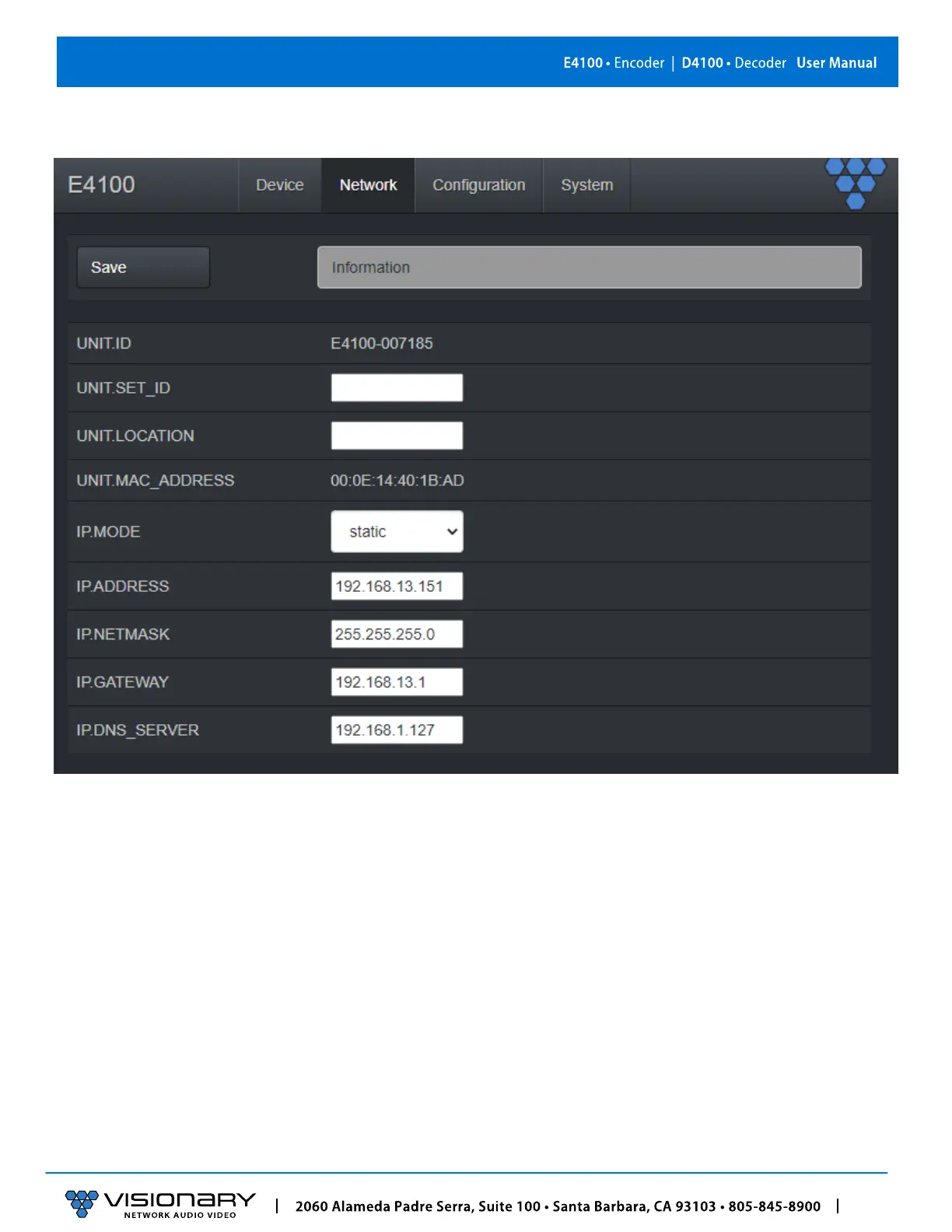
E4100 ENCODER NETWORK TAB
UNIT.ID – By default, the UNIT.ID of the encoder is the MAC Address. This can be changed by the user on the Network tab.
SET.UNIT_ID – User defined device name. For example: Display_1 or Source_3 (letters, numbers, dashes, and underscores only).
UNIT.LOCATION – User defined device location. For example: Office_1 or Conference_Room_2 (letters, numbers, dashes, and
underscores only).
MAC.ADDRESS – The MAC address of the unit.
IP.MODE – Modes are Static or DHCP. See section Configuring Encoder and Decoder IP Addresses.
IP.DHCP_STATUS – Shows the unit’s current st
atus: valid or invalid.
IP.ADDRESS – Shows the current value based on the unit’s mode. In Static mode, shows the unit’s static settings. In DHCP mode,
shows if the values are valid. If DHCP is failed, the mode shows as Auto IP (even though you cannot select this mode directly), and
the Auto IP values display in the IP.xxxxxx fields. See section Configuring Encoder and Decoder IP Addresses.
IP.NETMASK – Shows the current value based on the unit’s mode. In Static mode, shows the unit’s static settings. In DHCP mode,
shows if the values are valid. If DHCP is failed, the mode shows as Auto IP (even though you cannot select this mode directly), and
the Auto IP values display in the IP.xxxxxx fields. See section
Configuring Encoder and Decoder IP Addresses.
IP.GATEWAY – Shows the current value based on the unit’s mode. In Static mode, shows the unit’s static settings. In DHCP mode,
shows if the values are valid. If DHCP is failed, the mode shows as Auto IP (even though you cannot select this mode directly), and
the Auto IP values display in the IP.xxxxxx fields. See section Configuring Encoder and Decoder IP Addresses..



 To Next Page