Control
CONTROL
VISION LITE
Vision Lite is a 4K Matrix Switching, Video Wall Control, and configuration software for use with our E4200 Encoder and D4200
Decoder endpoints.
The Vision Lite Server Application is cross-platform capable (or OS agnostic), meaning that the software works on Windows, Mac,
and Linux. The Vision Lite User Interface is a browser-based application that works on PCs, Apple or Android tablets, and mobile
devices. Browsers supported are Chrome, Firefox, Internet Explor er, and so on.
Vision Lite automatically discovers units on your network without any configuration.
Follow these instructions to install the Vision Light software.
1. The latest Java JRE runtime is a prerequisite on the machine running VLite. The JRE can be found here: http://www.oracle.com/
technetwork/java/javase/downloads/jre8-downloads-2133155.html.
2. Download the latest Vision Lite software from visionary-av.com.
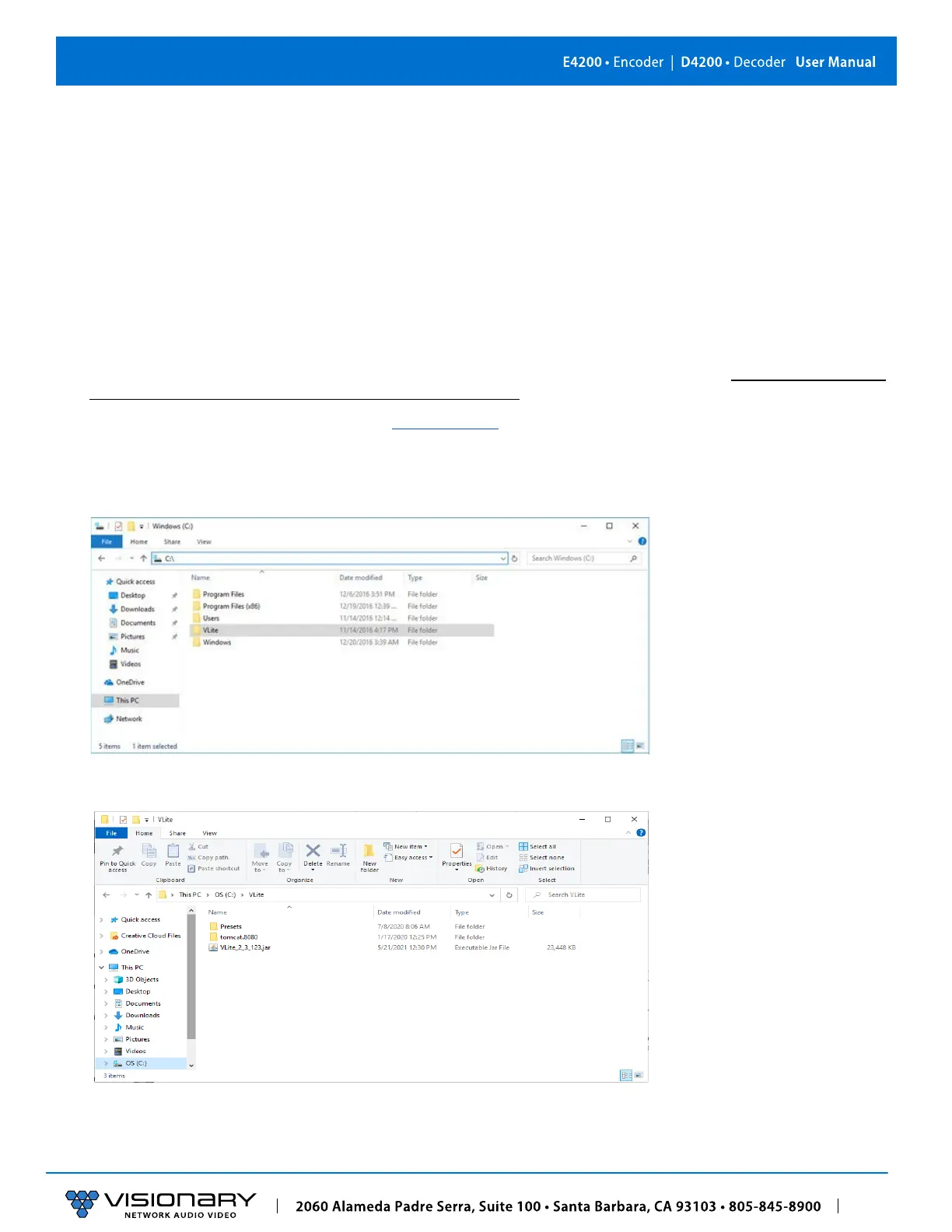
3. Manually create a read/write-able folder/directory
C:\VLite
at the root of your C:\ drive. This is the recommended directory
to place the downloaded
VLite.jar
file, but you can place the file anywhere on your computer.
4. Save the
VLite.jar
file that you downloaded to the
\VLite
folder you just created.



 To Next Page