IP.DNS_SERVER – (optional) Shows the current value based on the unit’s mode. In Static mode, shows the unit’s static settings. In
DHCP mode, shows if the values are valid. If DHCP is failed, the mode shows as Auto IP (even though you cannot select this mode
directly), and the Auto IP values display in the IP.xxxxxx fields. See section Configuring Encoder and Decoder IP Addresses..
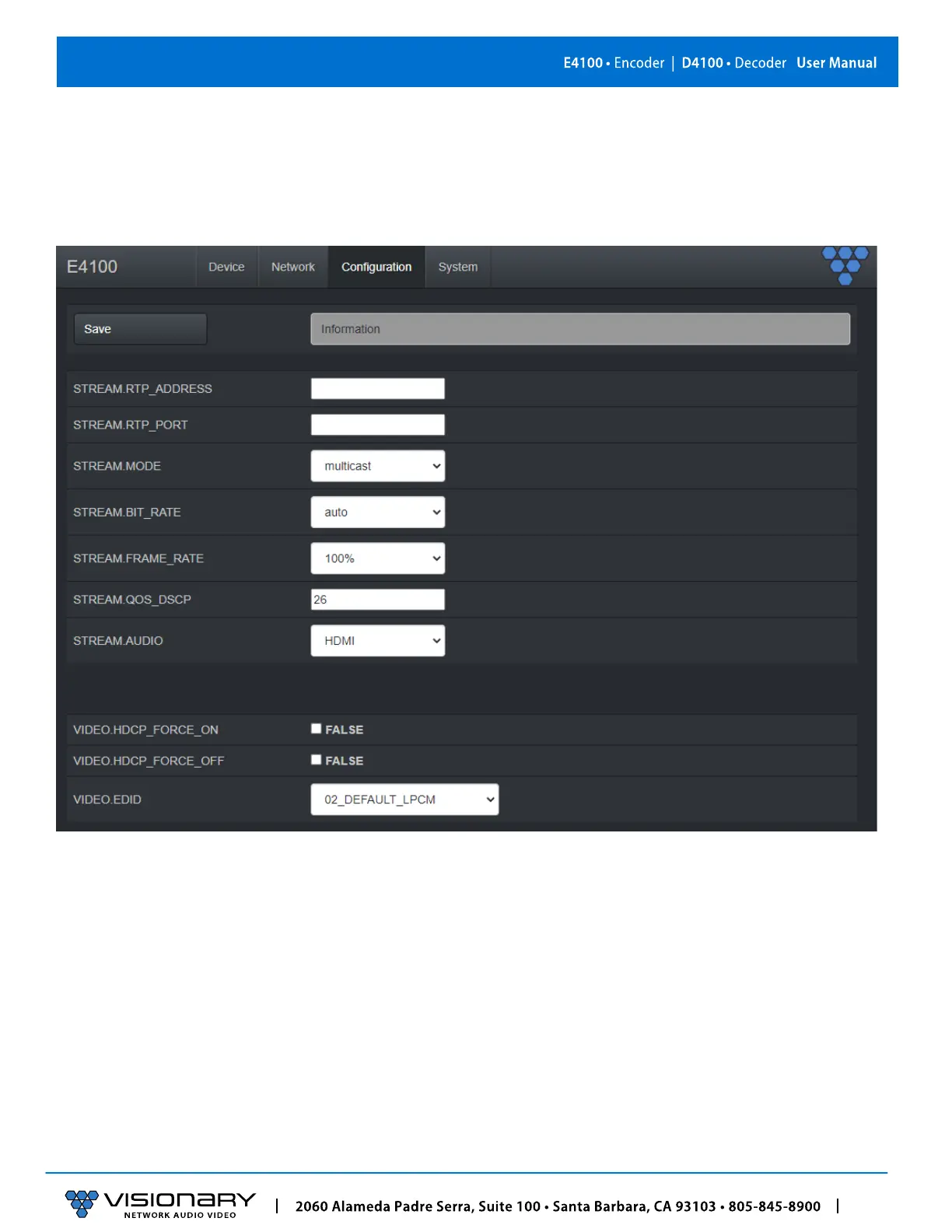
E4100 ENCODER CONFIGURATION TAB
STREAM.ENABLED – Setting for turning streaming on or off. See section Configuring Stream Settings (Manually).
STREAM.MODE – Unicast or multicast. See section Configuring Stream Settings (Manually
).
STREAM.BIT_RATE – See s
ection Stream Bit Rate.
STREAM.FRAME_RATE
– See section Stream Frame Rate.
STREAM.AUDIO – Select the source of audio for the AV over IP stream - HDMI, Analog - See section Audio Settings.
VIDEO.HDCP_FORCE_ON
– Force the encoder to accept only HDCP sources. See section HDCP Force On–Encoders and Decoders.
VIDEO.HDCP_FORCE_OFF
– Force the encoder to accept only non-HDCP sources. See section HDCP Force Off–Encoders only.
VIDEO.EDID
– Used to select between different default, prebuilt, and custom EDID files. See section Multi‐Input EDID Management.



 To Next Page