Page.18.
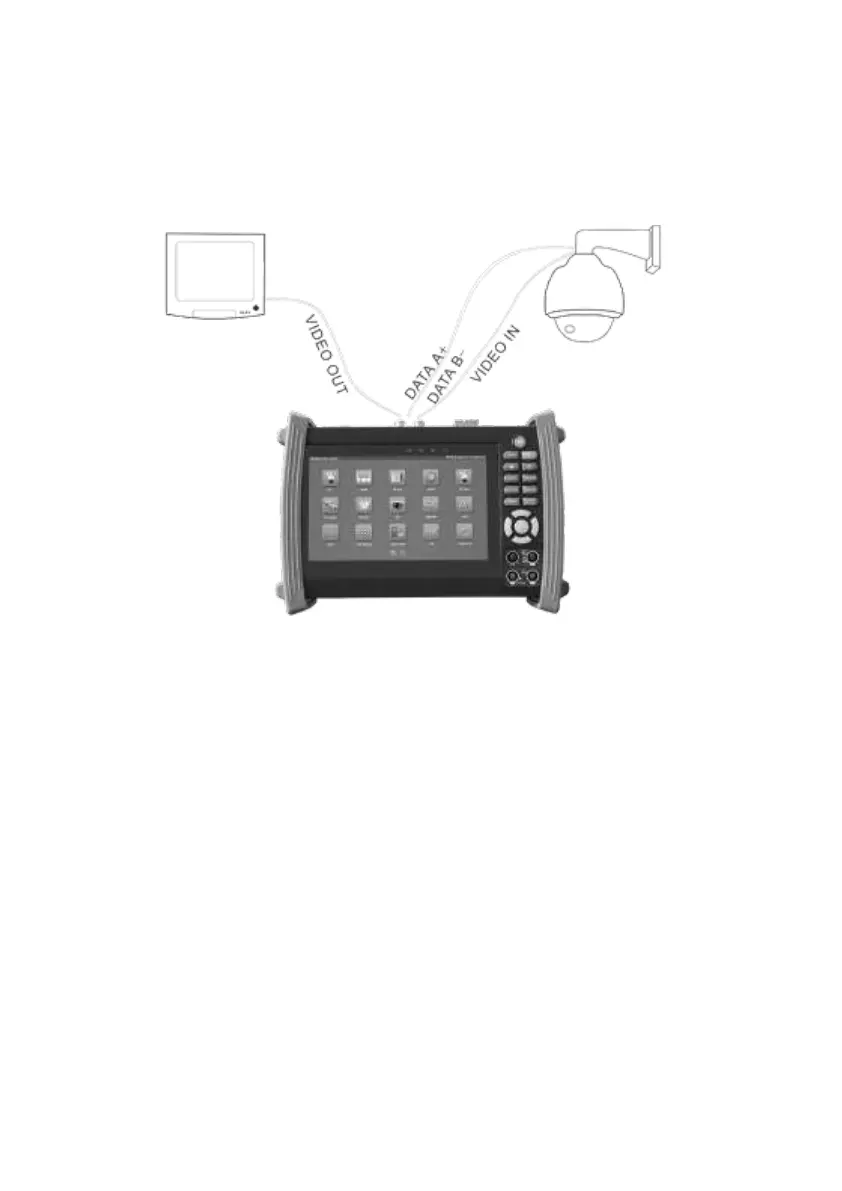
3.2.2 Analogue camera connection
(1) ) Connect the camera's video output to the IP tester’s VIDEO IN. The image will display on
the tester after pushing the PTZ icon
(2) CCTV IP Tester “VIDEO OUT” interface connect to the Video input of monitor and optical
video transmitter and receiver, the image display on the tester and monitor
(3) Connect the camera or the speed dome RS485 controller cable to the tester RS485
interface ,(Note positive and negative connection of the cable). Support RS232 PTZ
controller ,connect the RS232cable to RS232 interface of the tester
3.2.3 HD Coaxial camera connection
CVI, TVI, AHD camera are classified as HD coaxial cameras. Hereby the following instruction
of how to connect TVI camera to the tester is also applied to CVI and AHD cameras.


 To Next Page