11
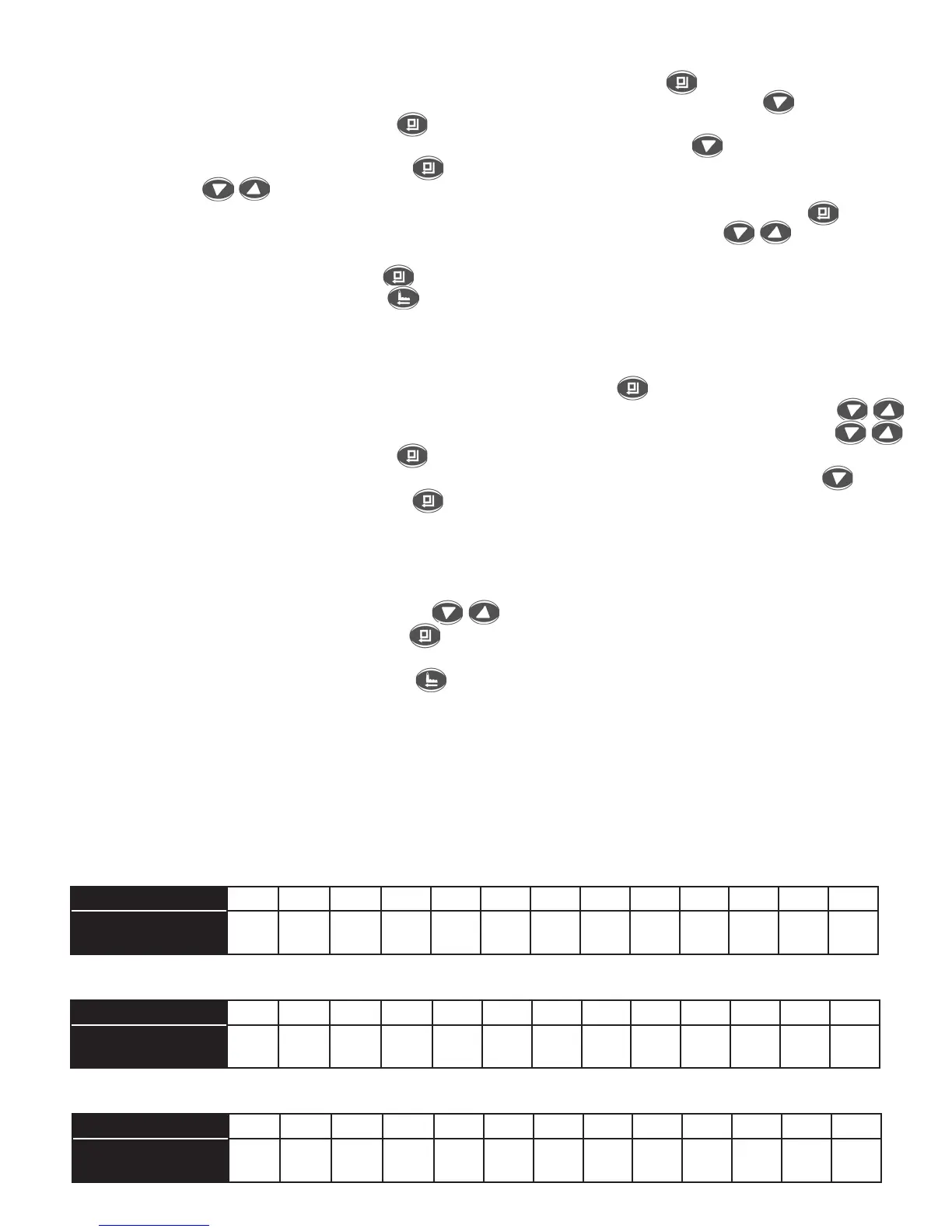
Hardness gpg 10 15 20 25 30 35 40 45 50 55 60 65 70
Soft Water Available
(U.S. Gallons)
2250 1500 1125 900 750 643 563 500 450 409 375 346 321
Hardness gpg 10 15 20 25 30 35 40 45 50 55 60 65 70
Soft Water Available
(U.S. Gallons)
2613 1742 1306 1045 871 747 653 581 523 475 436 402 373
Hardness gpg 10 15 20 25 30 35 40 45 50 55 60 65 70
Soft Water Available
(U.S. Gallons)
2900 1933 1450 1160 967 829 725 644 580 527 483 446 414
Medium Salt Setting (table B):
Low Salt Setting (table A):
High Salt Setting (table C):
3. Set The Regeneration Time Of Day:Thedefaultregenerationtimeissetat2:00AM.Ifyouwant
tochangethetimefortheregenerationcycletostartfollowthestepsbelow.
Step1. IfstartingatIn-ServicedisplayscreenpressMenu/Confirmkey toswitchtomainmenu.
Step2. Scrolldownto“AdvanceSettings”inthemainmenuusingthedownarrow .
Step3. PresstheMenu/ConfirmKey toenterthe“advancesettings”submenu.
Step4. Scrolldownto“SettingRechargeTime”usingthedownarrowkey .
Step5. PresstheManual/ConfirmKey .Thehourwillstartflashing.Usethedownanduparrow
keys toscrolltothecorrecthour.TheAMandPMwillchangeashoursadvancefrom
morningtoafternoon.WhenthecorrecthourischosenpressMenu/ConfirmKey andthe
flashingwilladvancetotheminutes.Usethedownanduparrowkeys toadvanceto
thecorrectminutes.
Step6.PresstheMenu/ConfirmKey willbringyoubackto“SettingRechargeTime”.
Step7.PresstheManual/ReturnKey twicetobringyoubacktotheInServiceDisplayscreen.
4. Set Capacity (amount of soft water available):
Thedefaultcapacityis1306U.S.Gallons@20grains/U.S.Gallonatmediumsaltsetting.
Step1. If starting at In-Service menupressMenu/Confirmkey to switch tothemainmenu.If
continuinginthemainmenuscrolldownto“AdvanceSettings”usingthearrowkeys
Step2. Ifalreadyinsubmenuscrolldownto“ResidualWaterSetting”usingthearrowkeys
PresstheMenu/ConfirmKey toenterthe“AdvanceSettings”submenu.
Step3. Scrolldownto“ResidualWater”inthesubmenusetupusingthedownarrowkey .
Step4. PresstheManual/ConfirmKey toenterthe“ResidualWater”setting.
Step5. Thecapacityresidualwatervolumenumberwillbeflashing.Inputthewatervolumecapacity
thatcorrespondstoyourwaterhardness.Thewaterhardnesswasdeterminedbyyouduring
testingofthewaterthatentersyourfacility.Refertotableontopofthevalveunderthetop
coverortableBbelow.Usetabletodeterminewatervolume capacitybasedon hardness.
Usethedownanduparrowkeys toinputthevolume.
Step6. PresstheManual/ConfirmKey .Thiswillreturnyoutothesubmenu.Ifcontinuingtosetup
otherparameterslikesaltsettingstayinthesubmenu.IfexitingsubmenuproceedtoStep7.
Step7. PressManual/ReturnKeytwice toexittheset-upmenutotheIn-ServiceDisplay.
5. Salt Setting At Low, Medium and High:
The water softener default salt settings are at a medium salt setting of 8.0 lbs. of salt for every
regenerationcycle.Theoptionexistsforsettingthesaltsettingtolowandhighsaltsetting.Whenthesalt
setting is set to low (6.0lbs. of salt) there will be less soft water available per regeneration cycle.
Thereforeyouwillregeneratemorefrequentlythanatmediumsaltsetting.Whenthesaltsettingissetat
high(14lbs.ofsalt)therewillbemoresoftwaterperregenerationcyclethanlowandmediumsetting.



 To Next Page