MGW Ace Encoder HEVC Encoding and Streaming Appliance
User Manual, Version 2.1 38
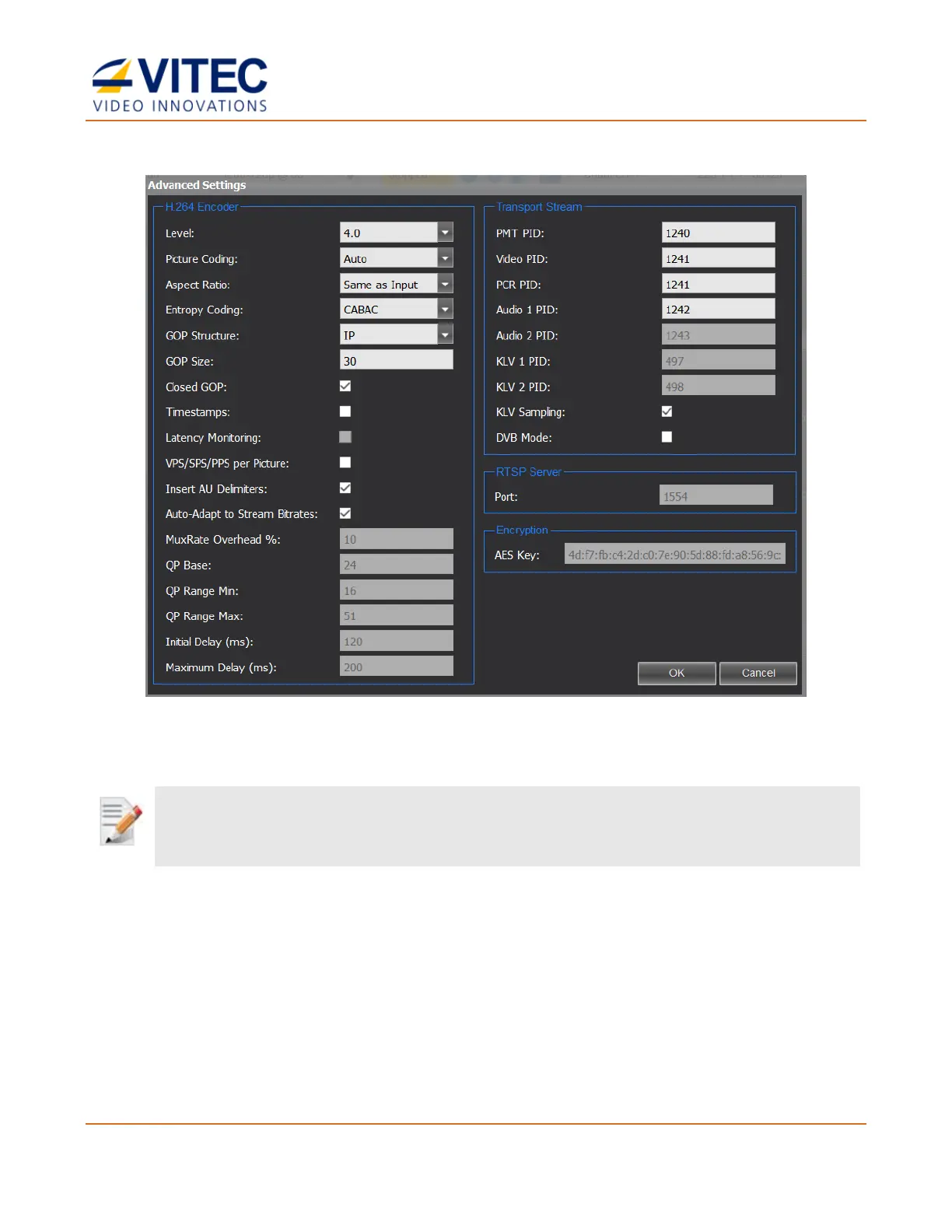
Advanced Settings – H.264
Figure 4-6: The Advanced Processing - H.264 window
Use the manual settings option cautiously. Incompatible combination of parameters that were manually set, may result in a
video and audio quality degradation. Consult with VITEC Support Team for recommendation on specific settings if you wish
to optimize the compression and streaming settings for a specific application.
• Level - The encoding level of the HEVC/H.264 codec. Choices are 3.0, 3.1, 3.2, 4.0
(default), 4.1, 5.0.
• Picture Coding - Determines how picture is compressed. Choices are Auto, Frame Only,
Field Only, MBAFF and PAFF.
• Aspect Ratio – The proportional relationship between the video width and its height. For
auto configuration select "Same as Input".
• VLC Mode – The Variable Length Coding is a code that maps source symbols to a variable
number of bits. Variable-length codes can allow sources to be compressed and
decompressed with zero error (lossless data compression) and still be read back symbol



 To Next Page