VIVOTEK
12 - User's Manual
Software Installation
Installation Wizard 2 (IW2), free-bundled software included on the product CD, helps you set up
your Network Camera on the LAN.
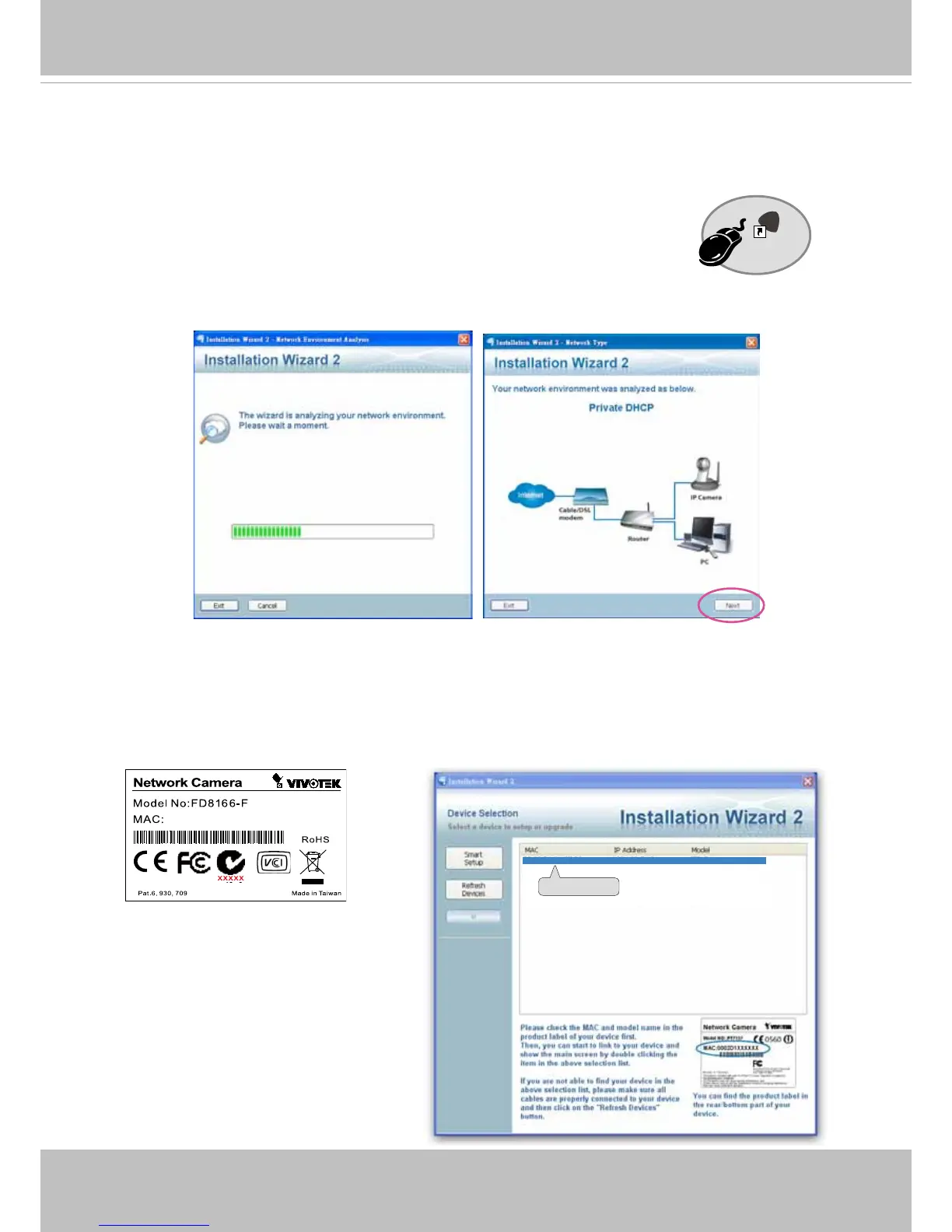
1. Install IW2 under the Software Utility directory from the software CD.
Double-click the IW2 shortcut on your desktop to launch the program.
2. The program will conduct an analysis of your network environment.
After your network environment is analyzed, please click Next to continue the program.
3. The program will search for all VIVOTEK network devices on the same LAN.
4. After a brief search, the installer window will prompt. Click on the MAC and model name
that matches the one printed on the product label. You can then double-click on the address to
open a management session with the Network Camera.
0002D1730202
00-02-D1-73-02-02 192.168.5.151 FD8166
Installation
Wizard 2
IW
2
0002D10766AD
2



 To Next Page