VIVOTEK
94 - User's Manual
Add server
To congure an event that will be recorded in video clips or snapshots, it is necessary to congure the
server and media settings so that the Network Camera will know what action to take (such as which
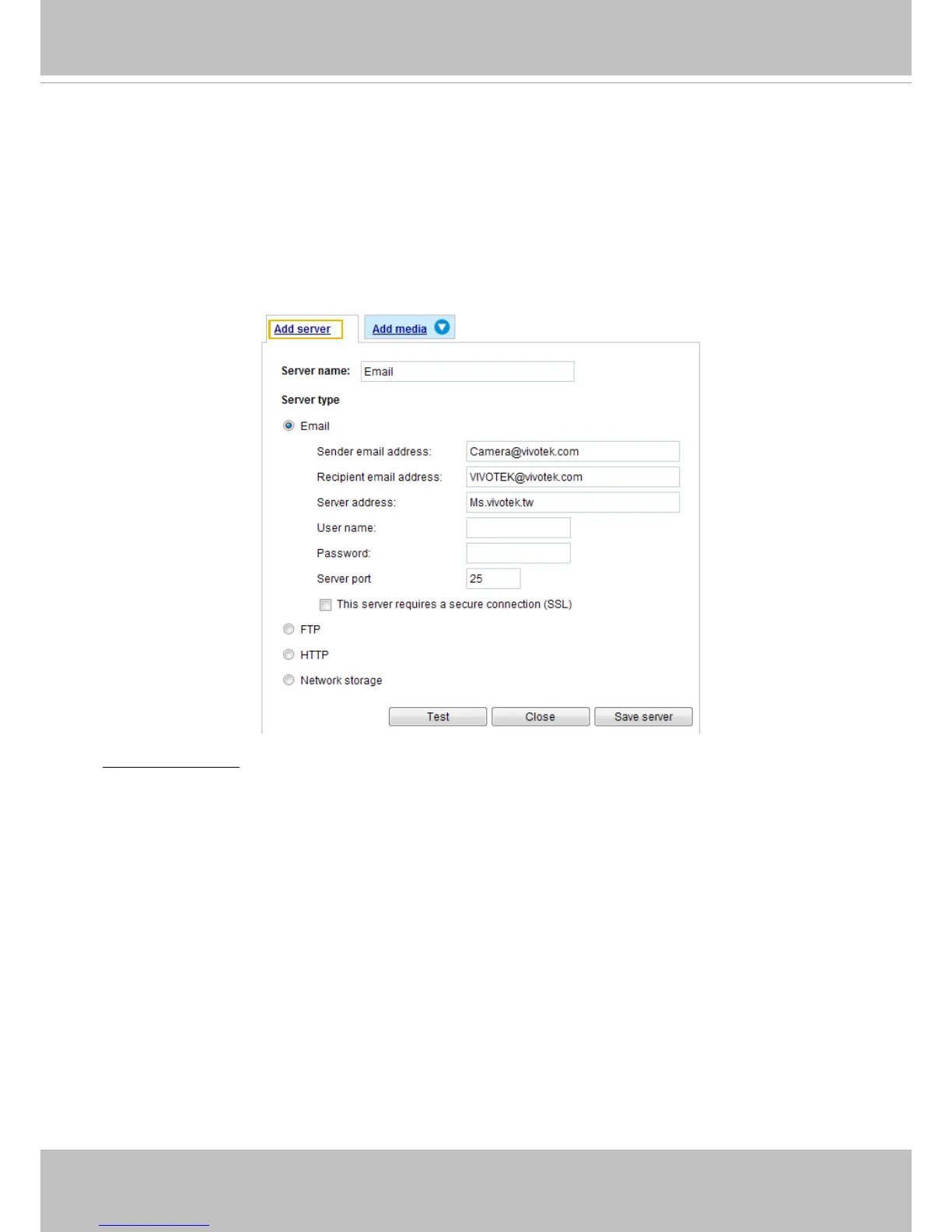
server to send the media files to) when a trigger is activated. Click
Add server
to open the server
setting window. You can specify where the notication messages are sent when a trigger is activated. A
total of 5 server settings can be congured.
There are four choices of server types available: Email, FTP, HTTP, and Network storage.
Select the item
to display the detailed conguration options. You can congure either one or all of them.
Server type - Email
Select to send the media les via email when a trigger is activated.
■ Server name: Enter a name for the server setting.
■ Sender email address: Enter the email address of the sender.
■ Recipient email address: Enter the email address of the recipient.
■ Server address: Enter the domain name or IP address of the email server.
■ User name: Enter the user name of the email account if necessary.
■ Password: Enter the password of the email account if necessary.
■ Server port: The default mail server port is set to 25. You can also manually set another port.
If your SMTP server requires a secure connection (SSL), check This server requires a secure
connection (SSL).



 To Next Page