VIVOTEK - Built with Reliability
User's Manual - 117
4. Clear:
This button removes camera from the current view cell. The view cell will then be available for
other cameras
5. Mute and Unmute:
These buttons stops or resumes audio from a live stream.
6. Restore:
This button restores the view cell's original position on the Liveview panel.
7. Maximize:
This button extends the size of current view cell to the full of the Liveview panel.
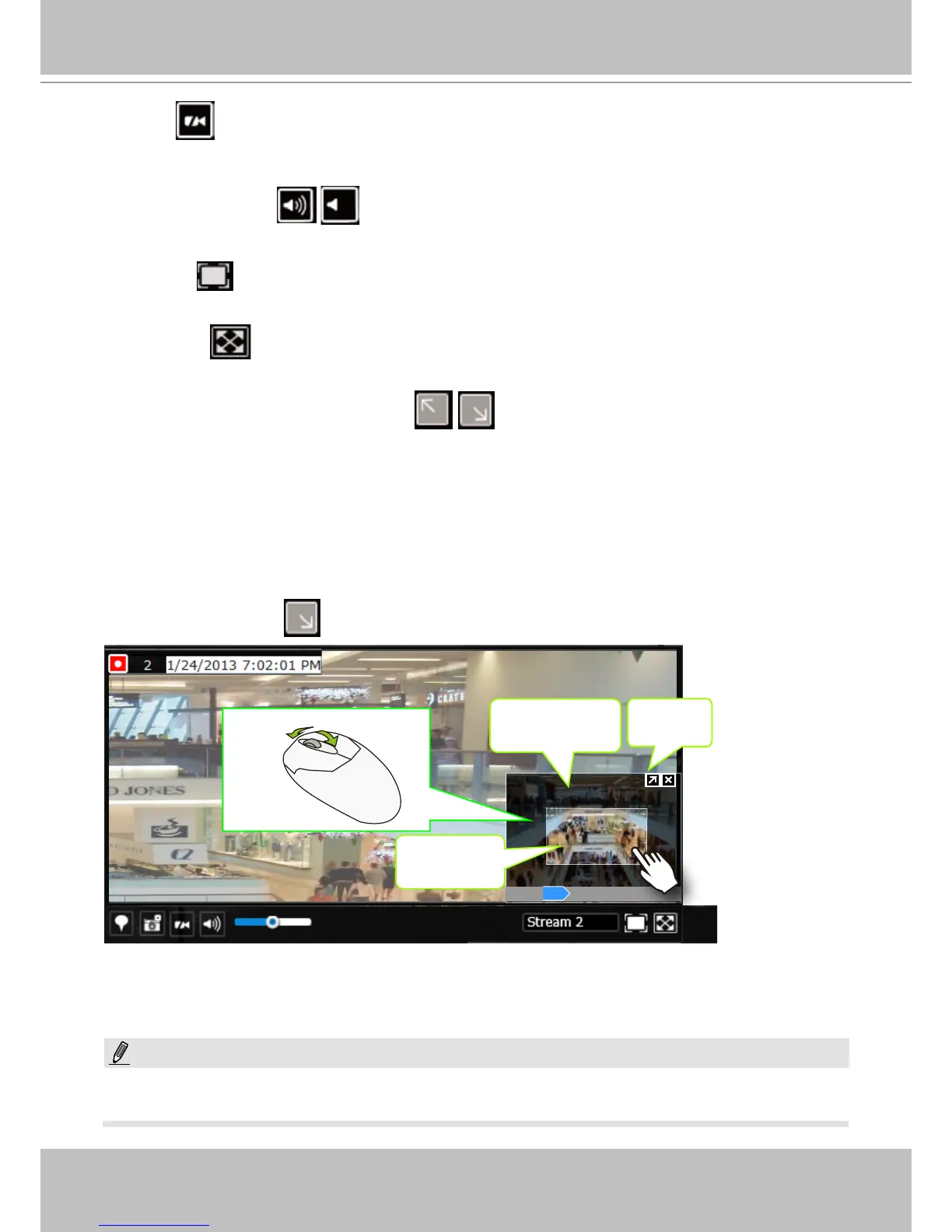
8. Activate and Deactivate PiP function:
PiP is short for Picture in Picture, a function that provides digital zoom into a live video.
When activated, a Global view window will appear at the lower right of the view cell as shown
below. You can display only a portion of the complete video frame as an area of your interest.
Using a click and drag on the ROI window, you can instantly move to other areas within the
video frame.
Global view
Zoom In Zoom Out
160%
ROI
Shrink/
Expand
Note that not every camera supports the PiP function.
You can resize the ROI window by a mouse hover on the lower-right corner of the window until
the resize mark appears. The default size of the ROI window is 25% of the Global view.
Click on the deactivate
button to close the PiP window.
The Talk function in the two-way audio is currently not supported.
NOTE:



 To Next Page