VIVOTEK - Built with Reliability
User's Manual - 47
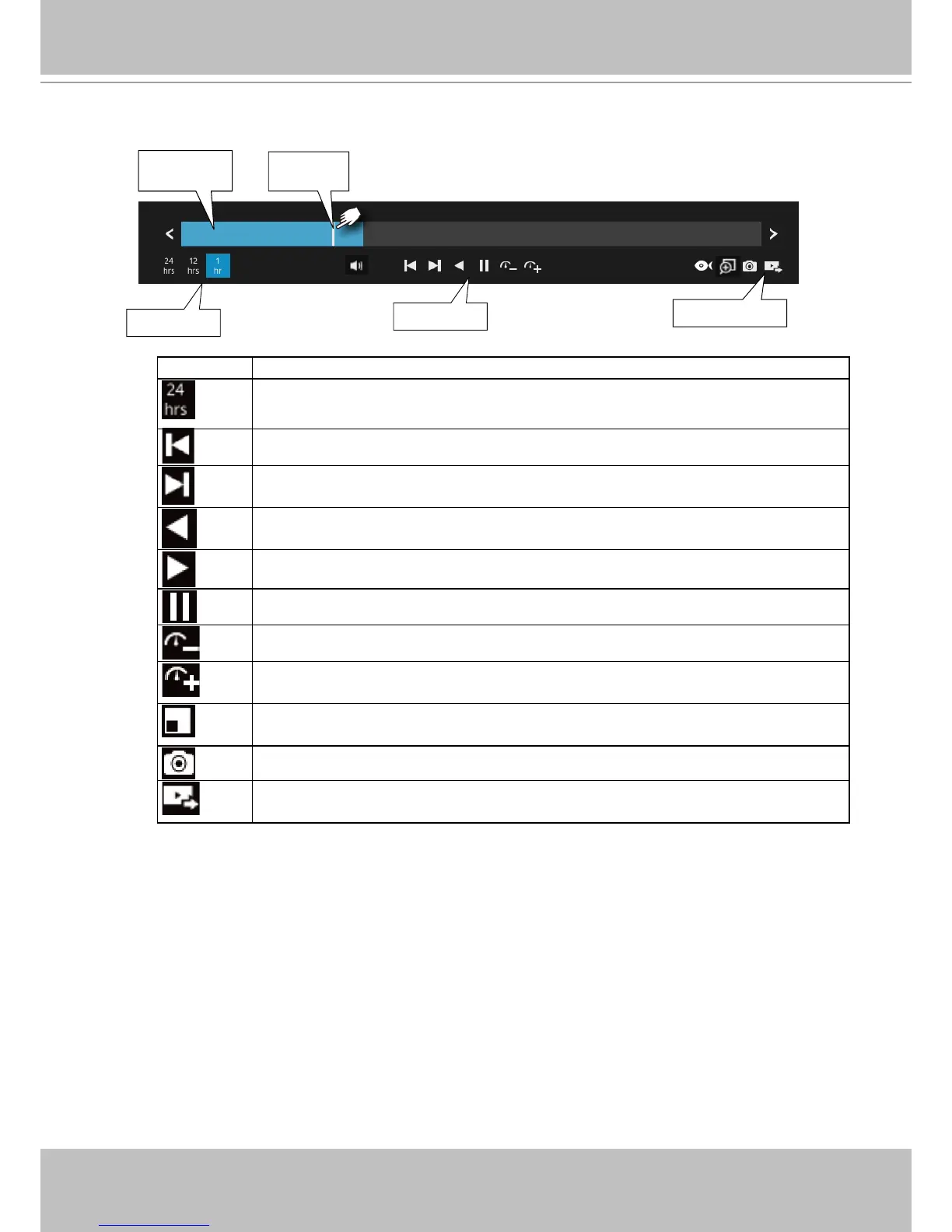
Current time
indicator
Span of existing
recording
Timeline scale
Control buttons
Functional buttons
The timeline bar enables quick skimming through the recording. Its functions are
described as follows:
Buttons Description
Time scale selector. Use the buttons to select the span of time displayed on
the tool bar.
Previous frame. (I-frame only)
Next frame. (I-frame only) After you paused a playback, use this button to
browse video frame by frame.
Play backwards.
Play. This button is available after you paused a playback.
Pause.
Each click on it speeds down by 1/2. The slowest speed is 1/16.
Each click on it speeds up by 2x. The fastest speed is 16 times.
The current playback status is indicated on the screen.
PiP (Picture in Picture). This applies when a camera is displaying the full of
its eld of view. You can use the PiP function to move to unrevealed areas.
Snapshot. Takes a snapshot of the current FOV.
Export clips. Use this function to select a span of time you want to export to
other medias.
By default, the playback starts from the beginning of a day's recording. While playing the
recorded video, click on the timeline to replay a point in time in the video.



 To Next Page