13
1.2 Installing the bracket and compressor
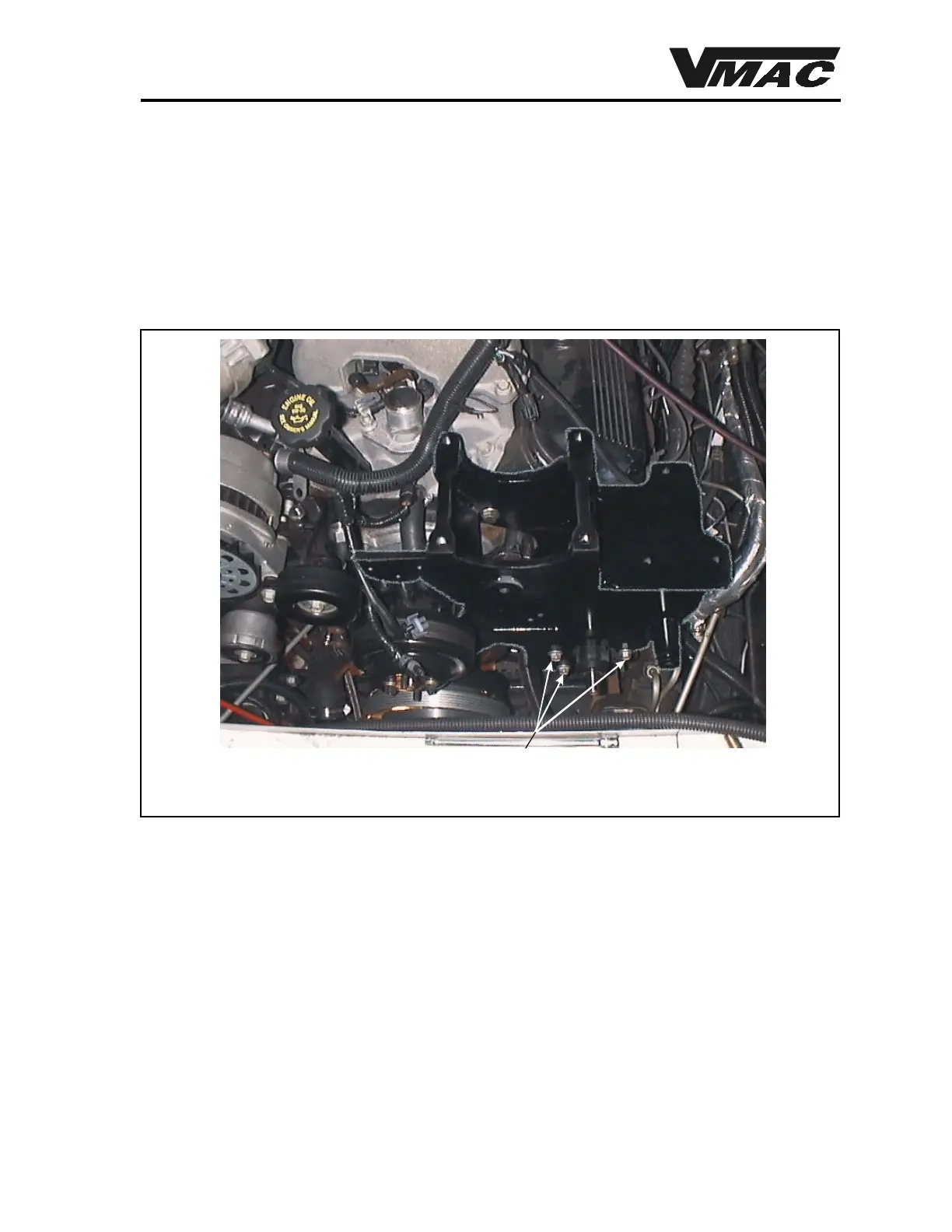
1. Apply Loctite to the five (5) 7/16 x 1-1/4 hex head cap screws and fasten the VR7000
bracket in place of the OEM air conditioning and power steering mounting bracket
(Figure 1.3).
2. Apply Loctite to the OEM hex head cap screws and install the power steering pump. Install
the supplied block support bracket to the rear of the power steering pump to the using
OEM bolts. Figure 1.3 shows the bracket in place on the cylinder block with the power
steering pump mounted on the bracket.
Figure 1.3
3. Apply Loctite to the three (3) 8 mm studs and thread them into the locations on the bottom
of the compressor.
4. Position the compressor in place on the VR7000 bracket, install the 8 mm nuts and 3/8 inch
flat washers and torque to 25 ft-lb.
5. Install the power steering pump pulley, making sure that your marks are correctly aligned.
6. Remove the hex head cap screw retaining the VR7000 idler, apply Loctite, install the cap
screw and torque it to 80 ft-lb.
7. Check the fastener on the VR7000 belt tensioner. Make sure that the Nylok nut is torqued
to 45 ft-lb.
DOCUMENT 19296
Three 10 x 30 mm supplied hex head cap screws



 To Next Page