A DIVISION OF MANGONEL CORPORATION
15
DOCUMENT 19296
VR7000 Oil Cooler
Mount Bracket
Radiator
VR7000 Oil Cooler
Vehicle Body
Crossmember
Use These Two
Existing Holes
For Heavy Duty
Installation
Drill These Two Holes
For Heavy Duty Installation
Use These Three Holes
For Standard Model Installation
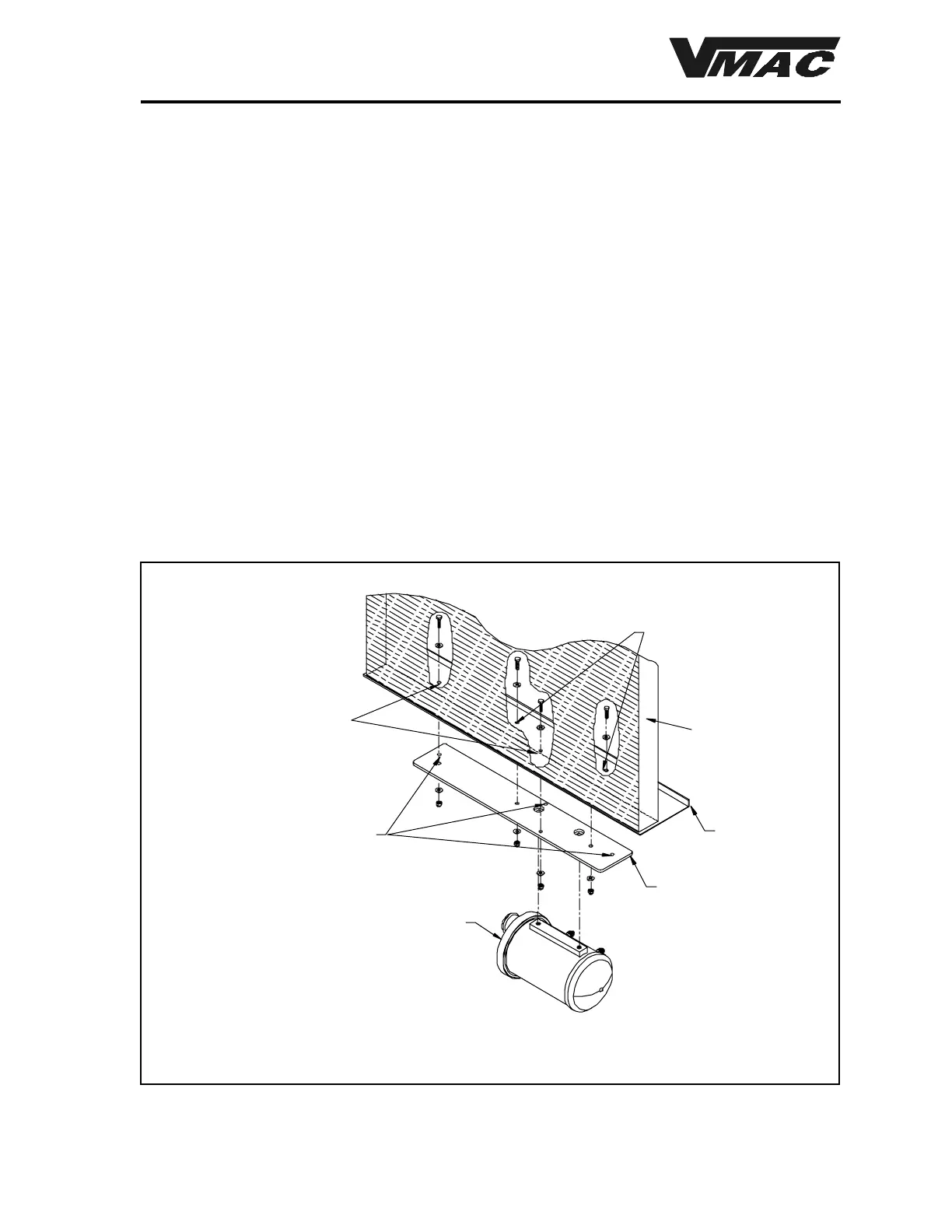
1.4.2 For heavy duty models
1. Remove the the two (2) hex head cap screws holding the flat cooler mounting bracket to the
oil cooler.
2. Attach the bracket to the crossmember using two (2) of the supplied 1/4 x 1 inch hex head
cap screws through the holes shown in Figure 1.5. Tighten them just enough to hold the
bracket snug on the crossmember.
3. Using the bracket as a guide, drill two 1/4“ holes in the locations shown in Figure 1.5.
4. Remove the two hex head cap screws and remove the mount from the body section.
5. Attach the bracket to the cooler using the hex head cap screws that you removed
previously. Use Locktite on these caps screws and tighten them securely.
6. Locate the cooler and bracket under the body section.
7. Install the the four (4)
1
/4“ x 1“ supplied hex head cap screws in the body section from under
the radiator and install the flat washers and Nylok nuts. Tighten the fasteners securely.
Figure 1.5



 To Next Page