23
Manual Programming
Use Manual Programming to adjust stimulation and/or detection parameters
individually.
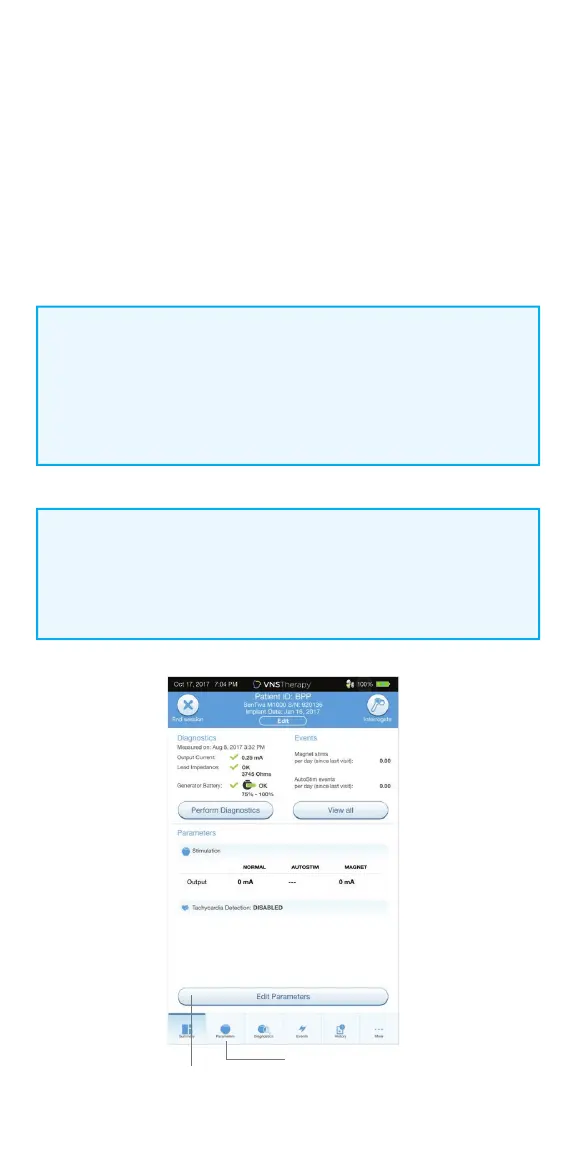
To manually program parameters:
1. From the Summary Screen, tap on the EDIT PARAMETERS button,
or tap on PARAMETERS in the Navigation Bar at the bottom of the screen
2. On the Parameters screen, select the Stimulation or Detection Tab.
Follow the on-screen prompts to make change to parameters
3. Tap APPLY CHANGES to program your changes
NOTE:
• After Implant: Set output current to 0 mA, slowly increase by 0.25 mA
increments until patient feels stimulation at a comfortable level
• Replacement Generators: Set output current at 0 mA, slowly increase
by 0.25 mA to previous therapy level to allow patient time to re-adjust
Edit
Parameters
Parameters
NOTE:
At the end of each o ce visit, the generator must be interrogated by
tapping the INTERROGATE button followed by tapping the END SESSION
button to ensure creation and accuracy of the session reports.



 To Next Page