35
Day/Night Programming
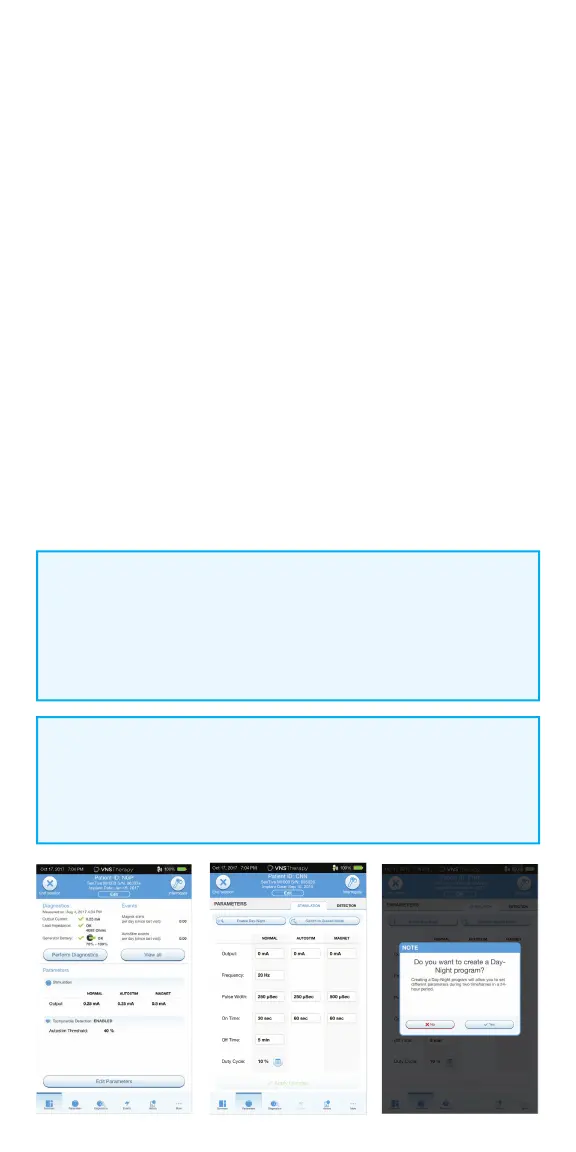
Use Day/Night Programming to deliver two independent therapy parameter
schedules at di erent times during a 24-hour period. In Day/Night
Programming mode, the SenTiva M1000 will:
• Deliver therapy according to two independent sets of parameters
• Deliver each therapy protocol at a specifi ed time during a 24-hour period
To enable Day/Night Programming:
1. Confi rm that the programmer date and time are correct
2. Tap on the EDIT PARAMETERS button, or tap on PARAMETERS in the
Navigation Bar at the bottom of the screen
3. On the Parameters Screen, select ENABLE DAY/NIGHT.
When asked “Do you want to create a Day/Night program,” tap YES
4. On the Nighttime Tab, follow the on-screen prompts to make selections for
active start and end times
5. On the Daytime Tab, the remaining hours from the 24-hour cycle are
automatically shown as the daytime active period. Customize stimulation
parameters as desired
6. On the DETECTION TAB, set AutoStim thresholds for both day and night.
Tap APPLY CHANGES
7. On the Apply Changes Screen, review the changes made and then tap
CONFIRM
NOTE:
Day/Night Programming is only available in Manual mode and is
not available in Guided Programming mode. Guided Programming
mode is unavailable if Day/Night Programming is enabled. Day/Night
Programming can be disabled at any time.
NOTE:
Time zone changes and Daylight Savings time changes must be
programmed manually. The programmer does not automatically adjust
for time changes.



 To Next Page