56
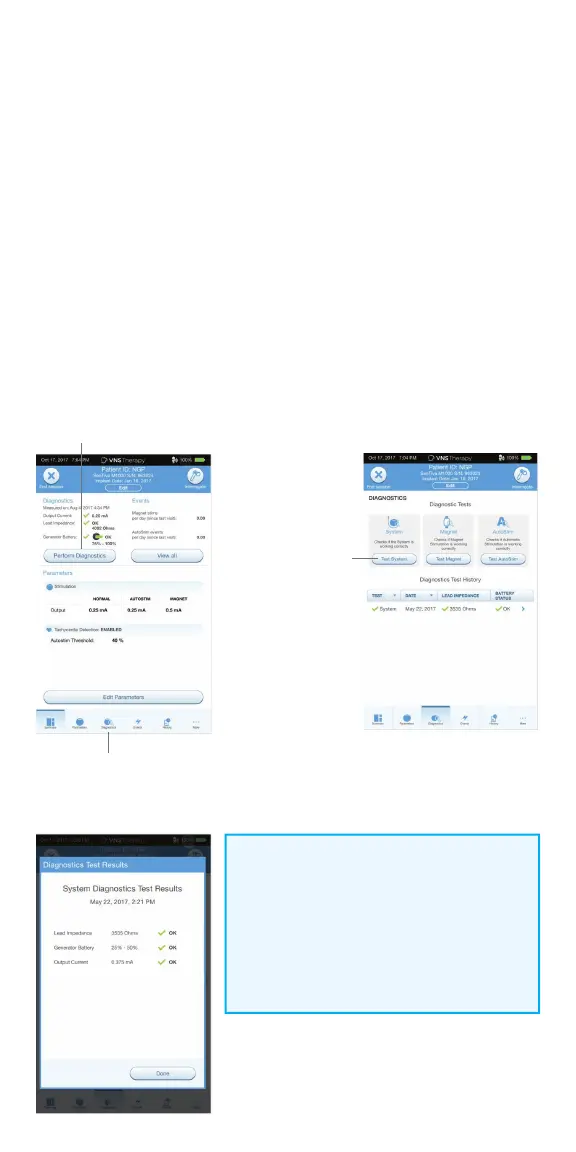
Perform System Diagnostic #2 and
Final Interrogation
Before closing, perform Diagnostic Test #2 to confi rm that the system is
working properly and delivering the programmed output current.
To perform System Diagnostic #2 and Final Interrogation:
1. From the Summary Screen, tap on the PERFORM DIAGNOSTICS button,
OR tap on the DIAGNOSTICS button in the Navigation Bar at the bottom
of the page
2. On the Diagnostics screen, tap TEST SYSTEM to start the test
3. Review the results, tap DONE
4. Tap INTERROGATE button on the top right corner of the screen and then
tap the END SESSION button at the top left of the screen
Diagnostics Button
Perform Diagnostics Button
Test System
NOTE:
At the end of parameter adjustment in the
operating room, the generator must be
interrogated by tapping INTERROGATE
followed by tapping END SESSION to ensure
creation and accuracy of session reports.



 To Next Page